
We cracked ACID and Apple Loops.Now tag a whole folder in one pass.
Array Studio Batch ACIDizes WAVs and writes real Apple Loops (tempo, beats, key, loop or one-shot) for an entire folder at once. Drop in your loops, check the detected tempo and key, and deliver. One app, one machine, Mac or Windows.
Mac + Windows · ACIDized WAV · Apple Loops AIFF · One machine. Whole folders.
Stay on one machine
Tag a whole pack without switching computers.
No more hopping between an old Mac, a Windows PC and three apps just to get loops to play in time.
Before: the old way
- Windows PC for ACID metadataOpen ACID Pro or an old Sound Forge to tag WAVs with tempo, key and loop points.
- Old Mac for Apple LoopsBoot an old OS just to run Apple Loops Utility.
- Guess the tempo and keyRun a key finder, count bars by ear, and hope the file name is right.
- Tag one file at a timeOpen, type, save, repeat, for hundreds of loops.
- Test in every DAWImport into Ableton, Logic and FL just to hear whether the loops actually behave.
After: with Array Studio Batch
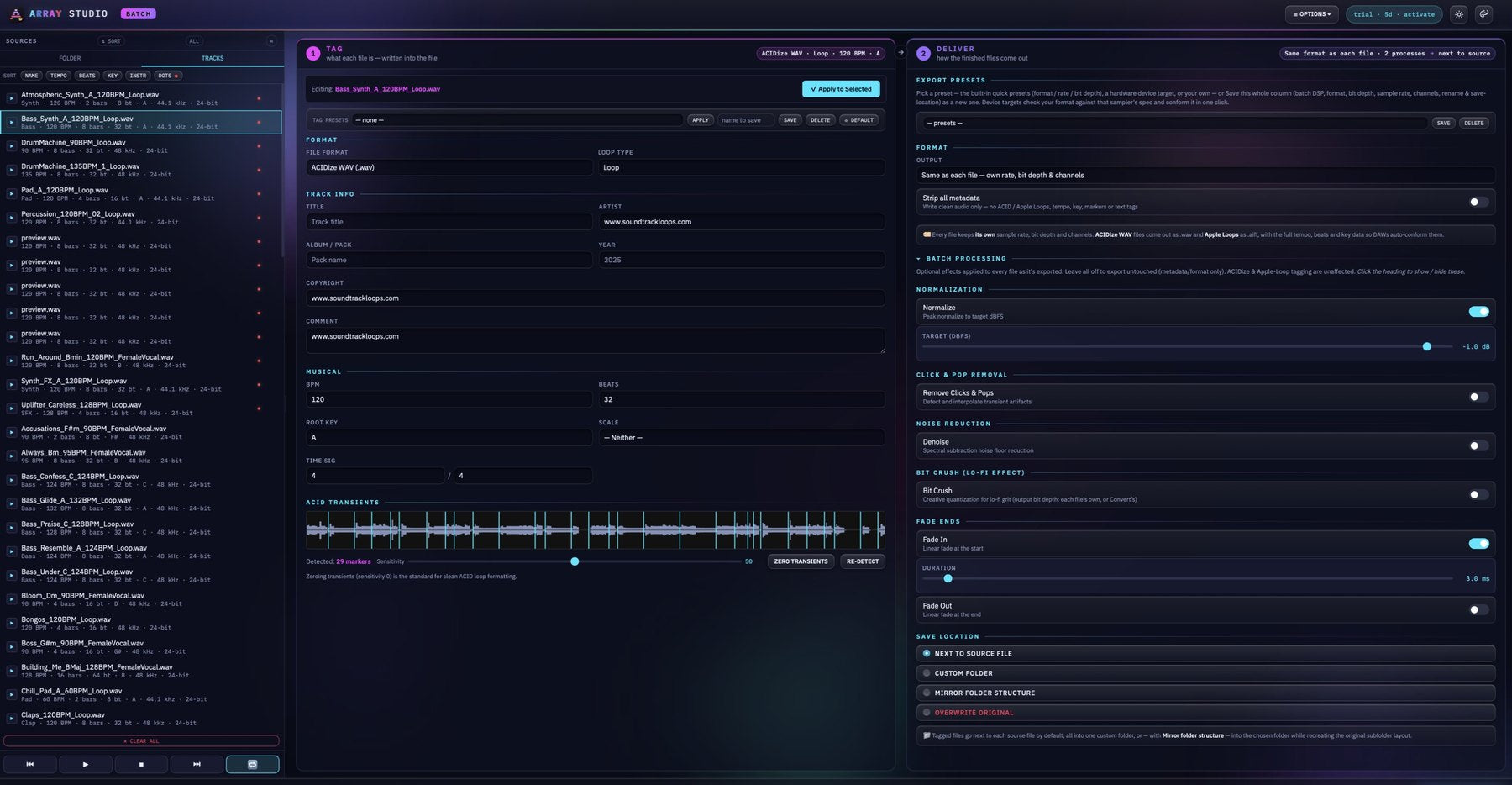
- Drop in a whole folderWAV or AIFF files, or entire folders. They land in the Tracks list, ready to tag.
- Tempo and key are detected for youRead from the file name, the tags the file already has, and the audio itself. You just check by ear.
- Choose ACIDize WAV or Apple LoopsLoop or one-shot, plus track info. Apply to Selected copies your changes to every selected file.
- Process on the way outNormalize, remove clicks and pops, denoise, bit-crush and fade. All optional, all off by default.
- Run AllSee exactly where every file will go, then write the whole batch in one pass. Your originals stay untouched.
Retire the old toolchain
All of these. One $10 app.
If you’ve been juggling any of these just to tag loops, Array Studio Batch does that job in one place.
- ACID Pro
- Sound Forge
- Apple Loops Utility
- WaveLab
- Audacity
We tested all of them. None could ACIDize and write proper Apple Loops in one pass on a modern computer, so we built our own. Our ties to Sonic Foundry, the original creators of ACID and Sound Forge, got us there. Tag a whole pack in minutes, and get it right.
What it does
One job. Done right.
25 years of formatting sounds for top producers and sample labels, focused into one tool: tag and deliver loops that every DAW reads correctly.
ACIDize WAV + Apple Loops
Real ACID metadata (tempo, beats, root key, loop or one-shot) and real Apple Loops AIFF files. These are the same writers as our full Array Studio, verified in Logic Pro, Ableton Live, FL Studio, Cubase, Studio One, Reaper and ACID.
The part everyone gets wrong
Tempo + Key + Instrument Auto-Detection
Every file arrives tagged. BPM, beats and root key are read from the file name, the file’s existing tags and the audio. Drop in 500 loops and check by ear instead of typing.
Detected, then verified by you
Whole-Folder Batch Tagging
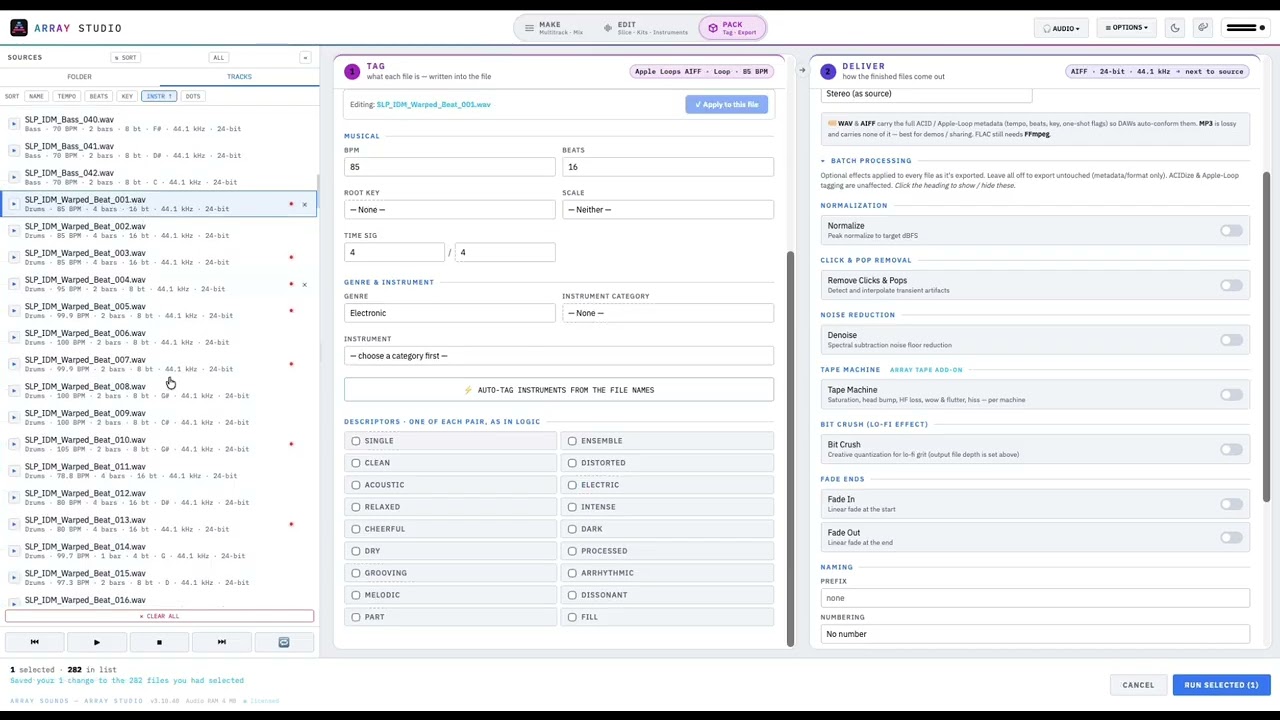
Load entire folders, click a track to see its values, and Apply to Selected to copy changes across the batch. Arrow keys step through the list. Save tag presets for your artist, copyright and comment fields.
Hundreds of files, one pass
ACID Transients
See the transient markers on every loop and adjust the sensitivity, or zero them for the clean ACID formatting professional packs ship with.
Pro-standard loop formatting
Deliver Two Ways
Same as each file: every file keeps its own sample rate, bit depth and channels, ACIDize comes out as WAV and Apple Loops as AIFF. Or MP3, for demo and preview copies.
Masters + demos
Batch Processing
Optional on the way out: normalize to a target level, remove clicks and pops, denoise, bit-crush, fade in and fade out. Tagging is never affected.
Five processors
Save Where You Want
Next to the source files, into one folder, into a mirrored folder structure, or over the originals. You see exactly where every file will go before anything is written.
No surprises
One Machine, Mac or Windows
No old Mac for Apple Loops Utility, no Windows PC for ACID Pro. Native on Apple Silicon and on Windows 10 and 11, fully offline, with one code for up to 3 of your computers.
Works offline
Batch processing
Clean audio, on the way out.
Five optional processors in a fixed, musically correct order. Leave them all off to deliver untouched audio. Your ACID and Apple Loops tags are written either way.
- 01DenoiseSpectral noise-floor reduction tames hiss and room tone.
- 02Remove Clicks & PopsDetects impulse spikes and interpolates across them.
- 03NormalizePeak-normalize to your target dBFS for consistent levels across the pack.
- 04Bit CrushCreative lo-fi quantization. An effect, not the export bit depth.
- 05Fade In & OutShort linear fades for click-free starts and ends, with adjustable length.
Quick tutorial
See the Pack / Batch tab in action.
A quick overview of the Pack / Batch tab: how a folder of sounds becomes a tagged, finished pack.
Inside the app
One window. Tag. Deliver. Done.
Real screenshots of Array Studio Batch tagging a folder of 102 loops.
The whole appTracks on the left, Tag in the middle, Deliver on the right. Run All writes the batch.
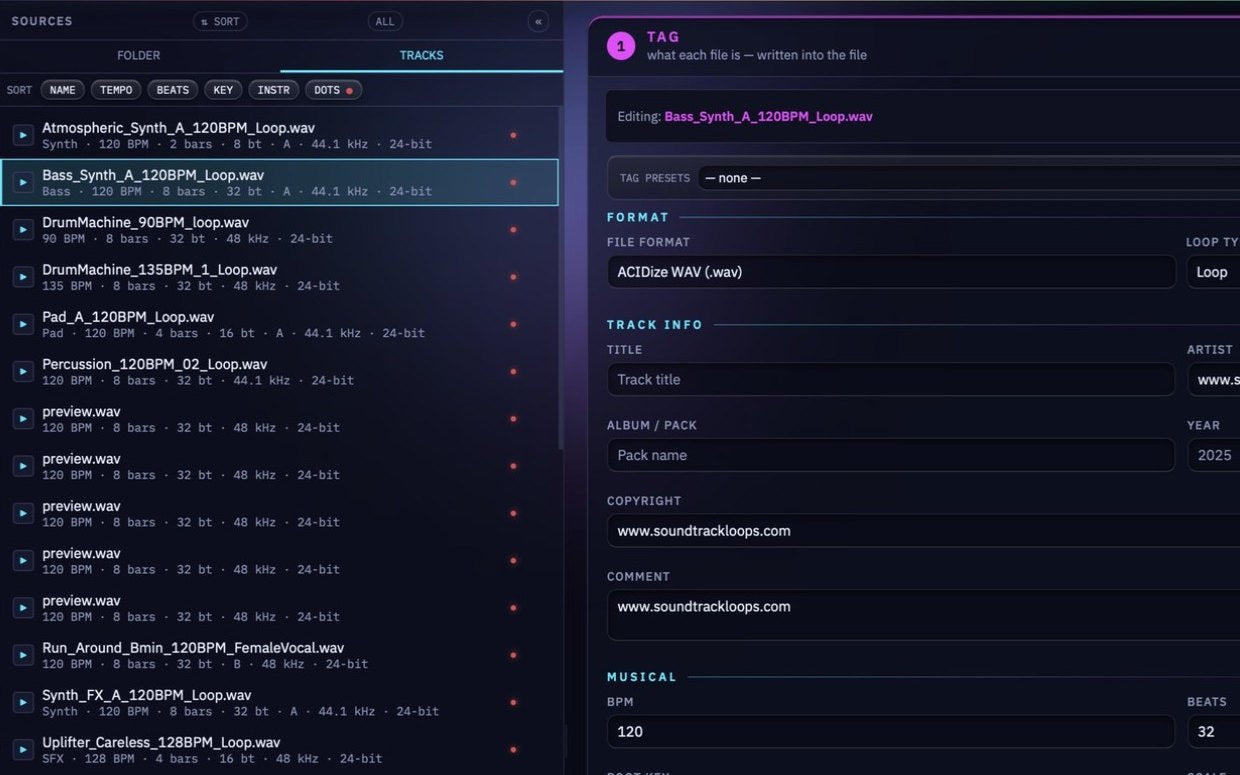
TracksEvery file shows its detected tempo, bars, beats, key, sample rate and bit depth at a glance.
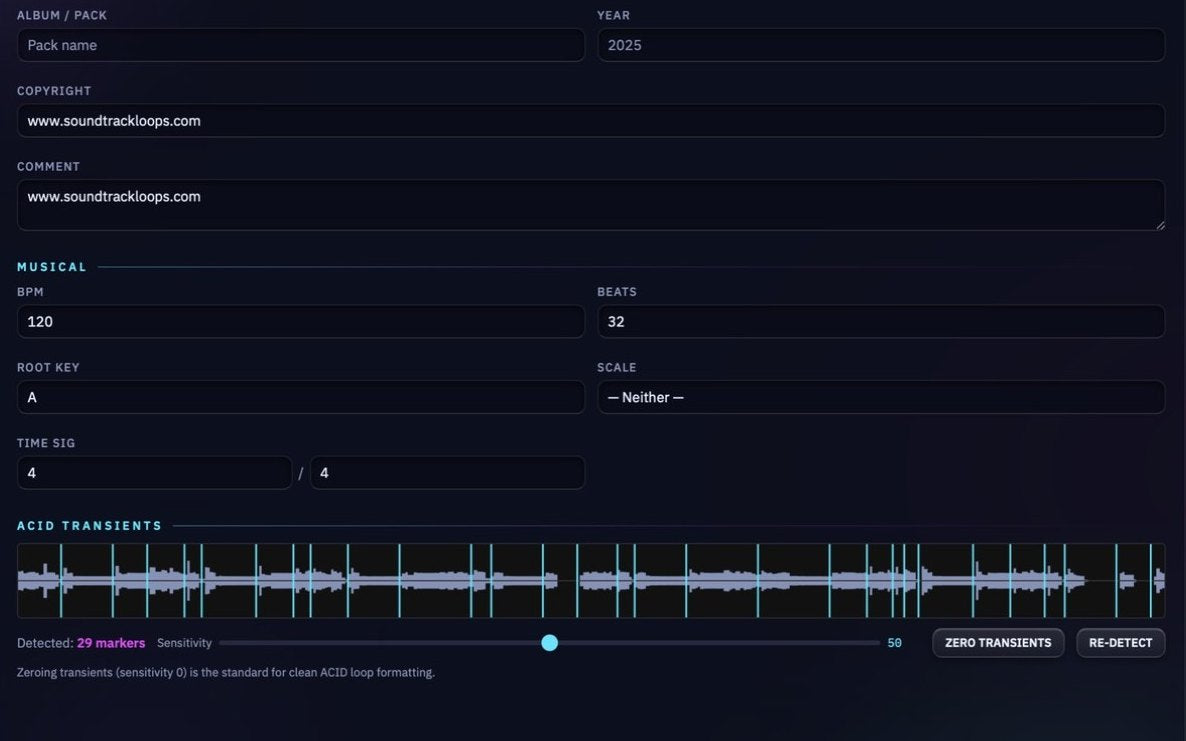
ACIDizeTempo, beats, root key and time signature, with ACID transient markers you can tune or zero.
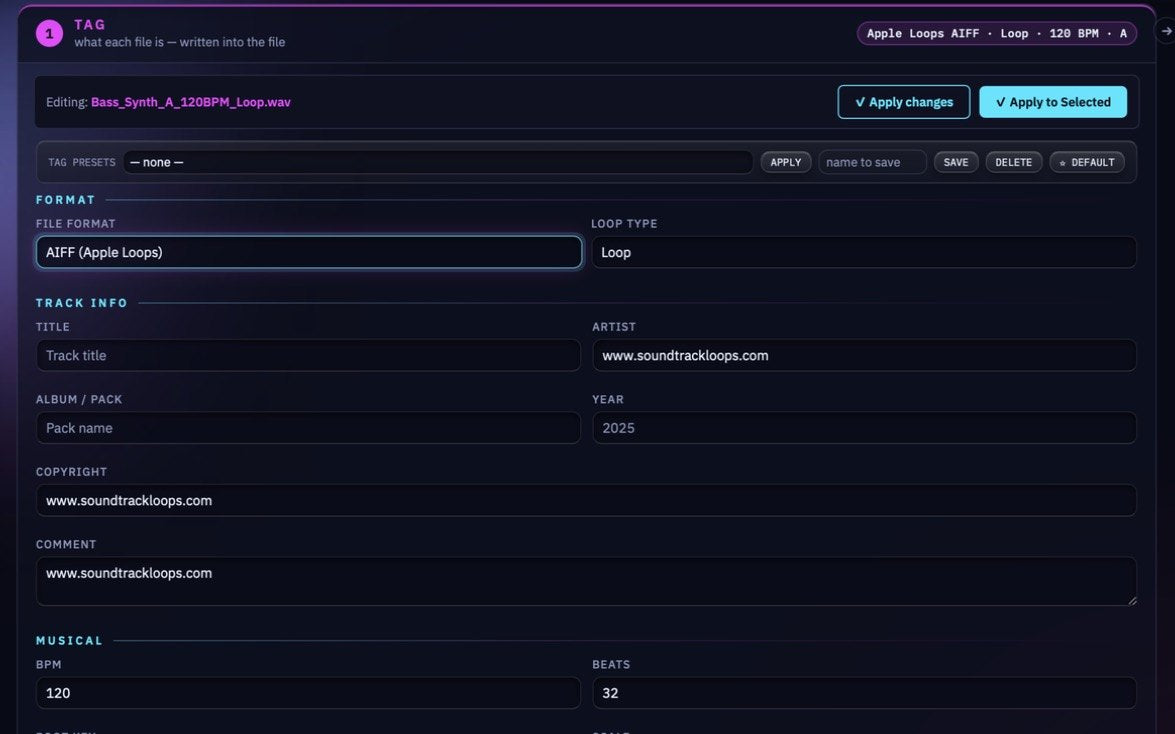
Apple LoopsSwitch to AIFF Apple Loops for Logic Pro and GarageBand, with genre and instrument tags.
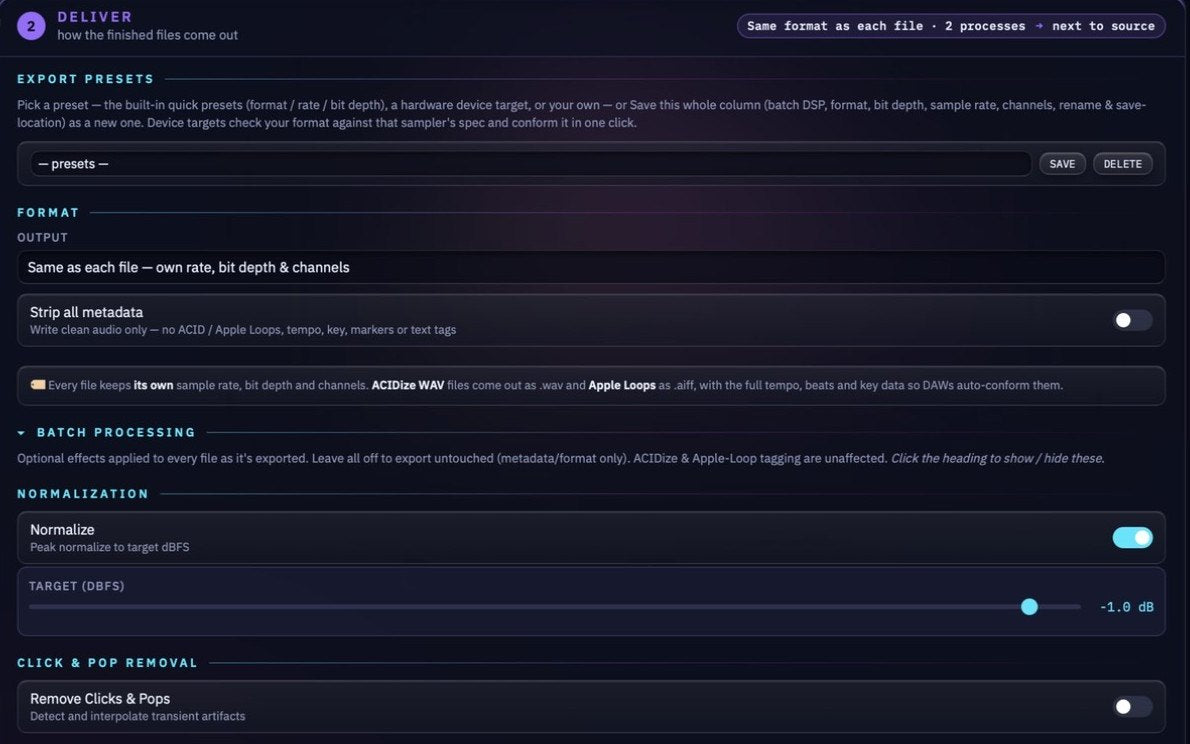
DeliverKeep each file’s own rate, bit depth and channels, or make MP3 demos. Normalize on the way out.
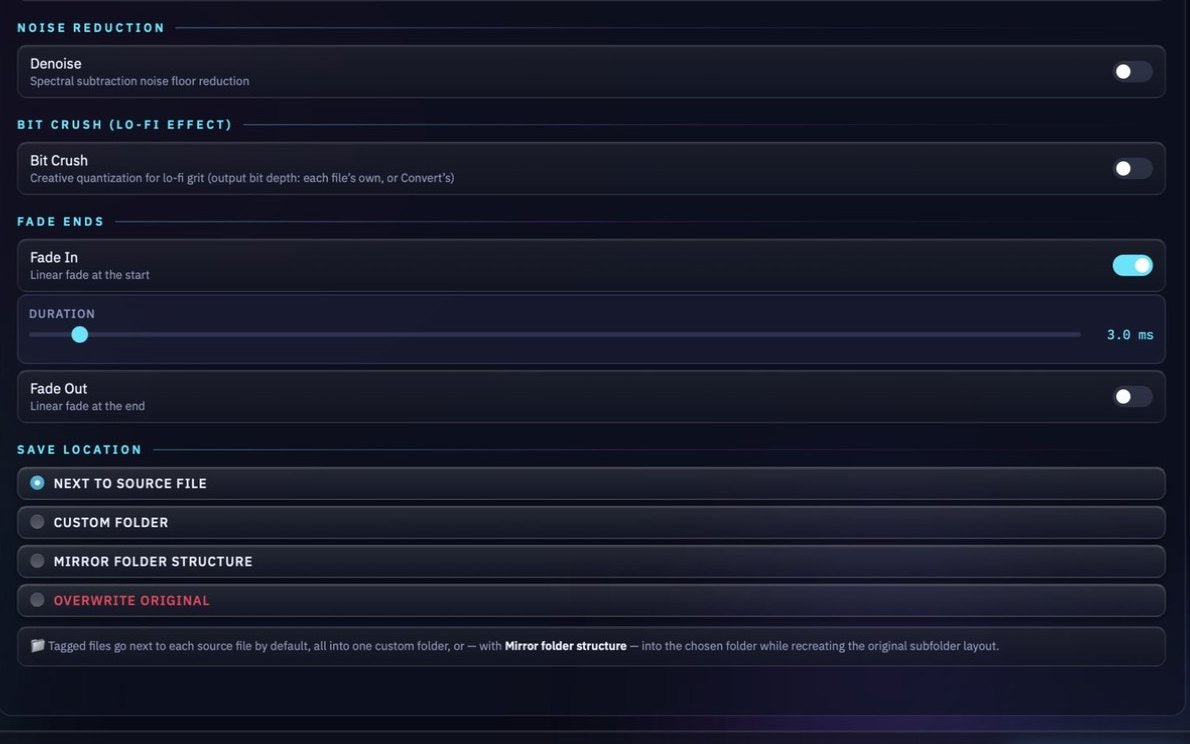
Batch processing + saveDenoise, bit-crush and fades, then save next to the source, into one folder, or mirrored.
25 years in the industry
Formatted for the pros. Now it’s yours.
25 years of professional audio formatting for companies such as Roland, Native Instruments, Loopmasters, Antares, Prime Loops, Acoustica Mixcraft, Sony, Magix, 1010music, and Soundtrack Loops. Our roots trace back to Sonic Foundry, the creators of ACID and Sound Forge, so we know these formats inside out.
All of that knowledge is baked into Array Studio Batch: the tagging engine we use on every pack we ship.
One price
Try it free. Keep it for $10.
Buy it once, get free updates, and hear from a real human, not a ticket queue, when you need help.
The full app
Array Studio Batch
Tag and deliver whole folders that every DAW reads correctly.
$10one-time
One code · up to 3 computers
- ACIDized WAV and Apple Loops AIFF for a whole folder in one pass
- Tempo, beats and root key detected for you
- Five optional batch processors on the way out
- One code works on up to 3 of your computers
- Free updates for life
- Mac and Windows, fully offline
Try it first
Array Studio Batch Free Trial
The same app, free to try before you buy.
Freetrial
Before you buy
- Everything works while you try it
- Mac and Windows
- Keep it for $10 when you’re ready
Want to make the sounds too?
Array Studio is the full sample manufacturing studio: record, arrange, slice and build kits, with the same ACID + Apple Loops writers in its Pack room. Pro $99, Standard $69.
In it for the long run
Built by us. Built for you.
Array Studio Batch is the tagging engine from our own daily driver. We tested every tool out there, none got ACID and Apple Loops right, so we built our own, and we keep improving it because we ship packs with it every week.
What you need
A small, focused desktop app for Mac and Windows. No DAW, no plug-in host, no subscription.
- macOS 12+ (Apple Silicon)
- Windows 10 / 11 (64-bit)
- Runs fully offline: offline activation, nothing uploaded
- One code works on up to 3 of your computers
- Free trial: everything works while you try it
Talk to a real human.
Bug, feature request, install question, hardware target you want added: write to us. We read every email and reply personally, usually within a business day.
WAV
ACIDized + RIFF INFO
AIFF
Apple Loops (Logic-verified)
MP3
Demo and preview copies
Input
WAV or AIFF files, or whole folders
Questions
Good to know before you buy.
What exactly does it write into my files?
Real ACID metadata (tempo, beats, root key, loop or one-shot) into WAV files, and real Apple Loops AIFF files. The results are verified in Logic Pro, Ableton Live, FL Studio, Cubase, Studio One, Reaper and ACID.
Will it change my audio?
Only if you ask it to. The five processors are optional and all off by default, and your tags are written either way. Your originals stay untouched unless you choose to save over them.
Do I have to type the tempo and key for every loop?
No. BPM, beats and root key are read from the file name, the file’s existing tags and the audio. You check by ear instead of typing.
How many computers can I use it on?
One code works on up to 3 of your computers.
Does it need an internet connection?
No. It runs fully offline, with offline activation, and nothing is uploaded.
Which computers does it run on?
macOS 12 or later on Apple Silicon, and Windows 10 or 11 (64-bit).
Is there a free trial?
Yes, and everything works while you try it. Keep it for $10 when you’re ready.
How is this different from Array Studio?
Array Studio Batch is the tagging engine on its own, and it uses the same ACID and Apple Loops writers as the full app. Array Studio adds the Make and Edit rooms: a 64-track multitrack, instruments, effects, slicing and kit building.
Ready to tag?
The professional standard forACID + Apple Loops.
Drop in a folder, check the detected tempo and key, and run the batch. Every DAW reads the result, and you never leave your one computer. Try it free, then keep it for $10.
One-time purchase · Mac + Windows · Free trial · Works offline · Up to 3 computers
