
The sample manufacturing studio.Raw idea in. Finished pack out.
Array Studio records, arranges, edits, slices, tags and delivers finished sample packs in one app, on one computer. Stop passing your sounds through a stack of programs and a second machine just to ship a pack. Then cut the demo video and record the walkthrough, right there too.
One-time purchase · Free updates for life · Mac + Windows · Runs fully offline
Do more in one app
Ten programs and two computers. Or one app.
Most sample packs pass through five or six programs before they ship. The tagging alone used to mean a Windows PC for ACID and an old Mac for Apple Loops Utility. Array Studio is the whole trip, on one computer.
The old production line
- Mixed In Key
- Ableton Live
- Sound Forge
- Audacity
- WaveLab
- ACID Pro
- Kit Maker
- Chicken Systems
- Sample Robot
- Apple Loops Utility
- Computer 1A Windows PC, just for ACID metadata
- Computer 2An old Mac, just to run Apple Loops Utility
If you use any or all of these programs, Array Studio is pretty much all of that, in one app.
The Array Studio line
1app. One computer. Start to finish.
- Make the sounds on a 64-track multitrack, with drum machine, chord and synth instruments and amp, tape and lofi effects
- Edit them: slice, fix loops, build drum kits and multi-sample instruments
- Pack them: ACID + Apple Loops tagging and batch delivery in one pass
- Show it: cut the demo video and record your screen and camera for tutorials
- Native on Mac and Windows, and it all runs offline
No one else has cracked batch ACIDizing and Apple Loops tagging in one app.
Three rooms. One production line.
Make. Edit. Pack.
Most studios are built to finish a song. Array Studio is built to manufacture a sample pack: make the sounds, cut them up, tag them properly, and deliver the pack.
Station 01 · Make · Multitrack
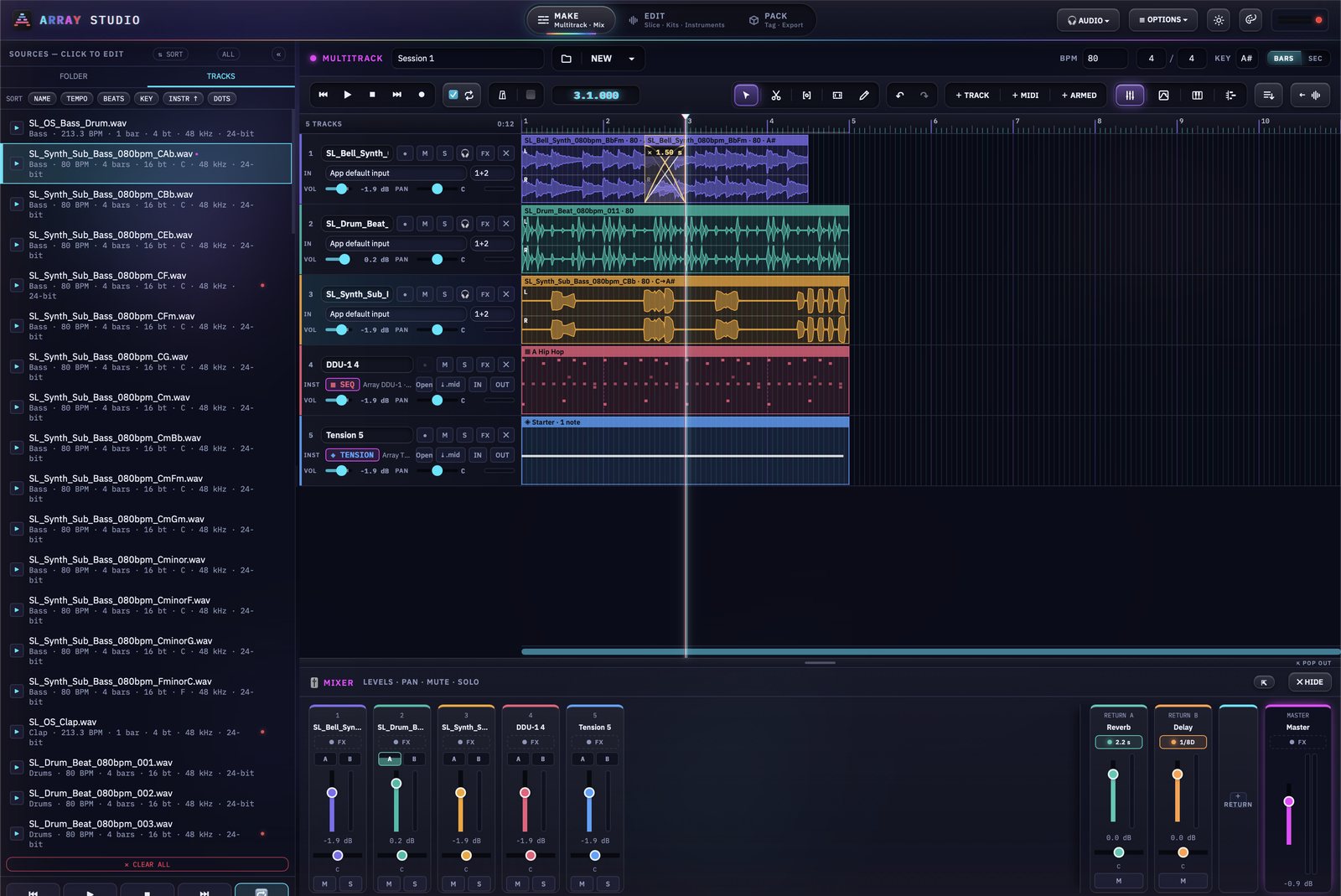
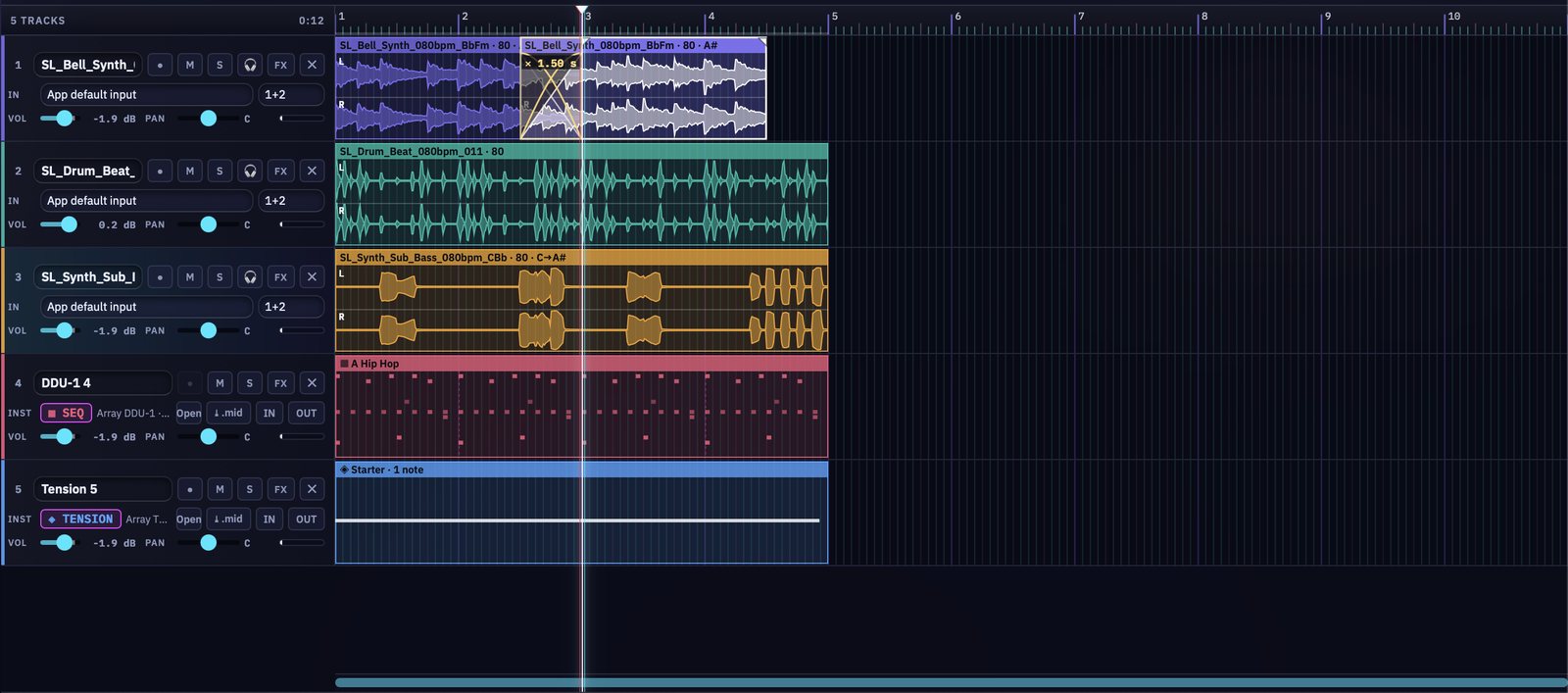
Record and arrange up to 64 tracks.
A mini DAW built for sample makers. One project tempo and key drive everything: drop a loop and it time-stretches and transposes to fit, pitch intact.
- Record armed tracks with count-in, punch-in and a crash-safe native recorder
- Video, picture and text tracks with titles, effects and transitions, for scoring, demos and tutorials
- Record Video: your screen, camera and mic in one take, straight onto the timeline
- Drag tracks to reorder them, and crossfade clips by overlapping them
- DDU-1 Digital Drum Unit, Chord Spire, Double Scoop and Tension instrument tracks with a shared Piano Roll
- EQ · Comp on every track, Space reverb and delay on sends, and a full mixer
- MIDI Learn on any control, plus HQ or Classic time-stretch per clip
Station 02 · Edit · Kit Maker
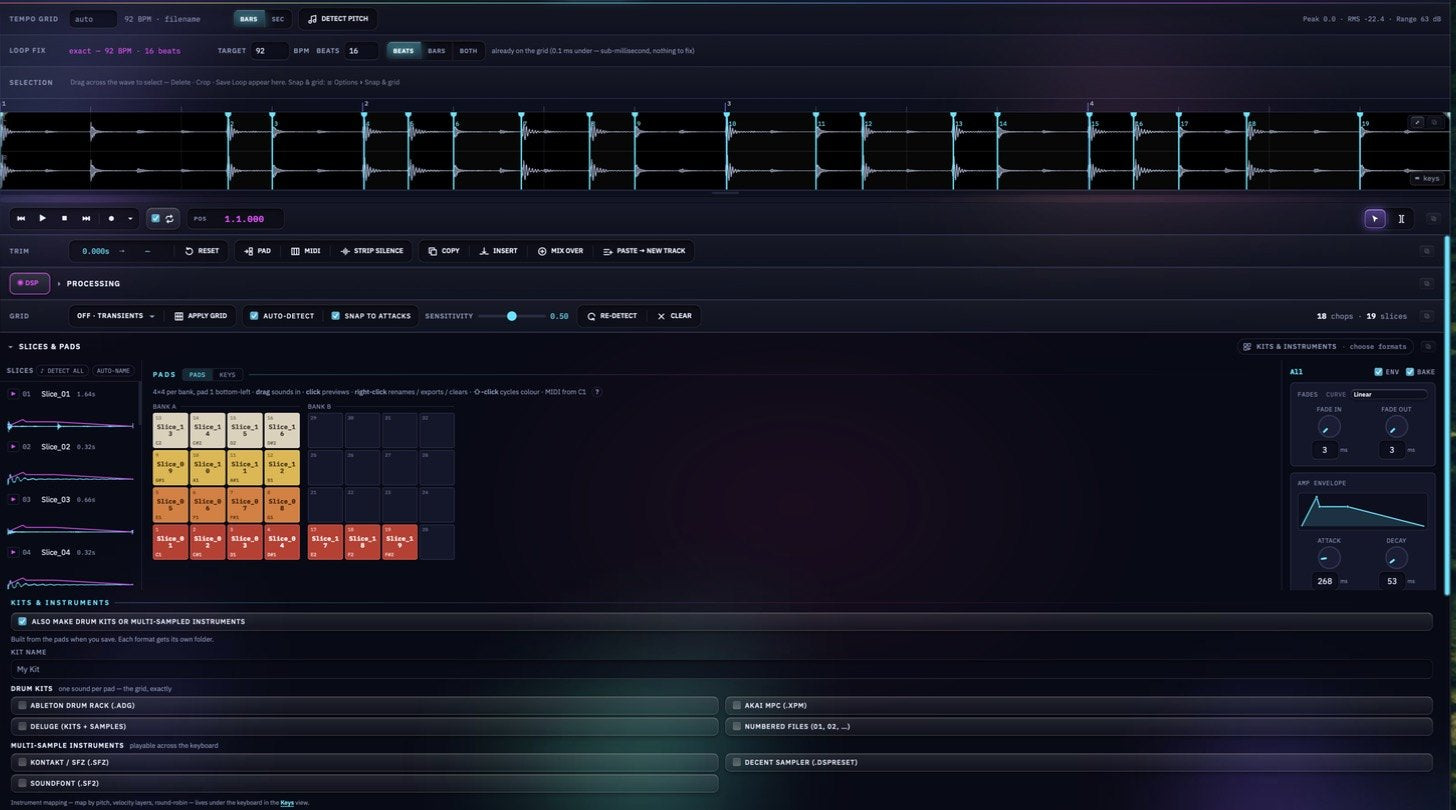
Slice it. Pad it. Build the kit.
One file at a time: trim, fade, fix the loop, process it, slice it onto the pads. Then build finished drum kits and playable multi-sample instruments from the same pads.
- Transient or grid slicing with per-slice fades, ADSR and curve shapes
- Loop Fix trims or pads a loop onto an exact whole-number tempo, with tail blending
- Drum kits for Ableton Drum Rack, Akai MPC, Deluge and numbered files
- Multi-sample instruments for Kontakt / SFZ, Decent Sampler and SoundFont, auto-mapped by pitch
- Per-slice key detection, MIDI extraction and a sample-chain builder
- Auto-sample a hardware synth over MIDI into a playable multi-sample instrument
Station 03 · Pack · Tag & Deliver
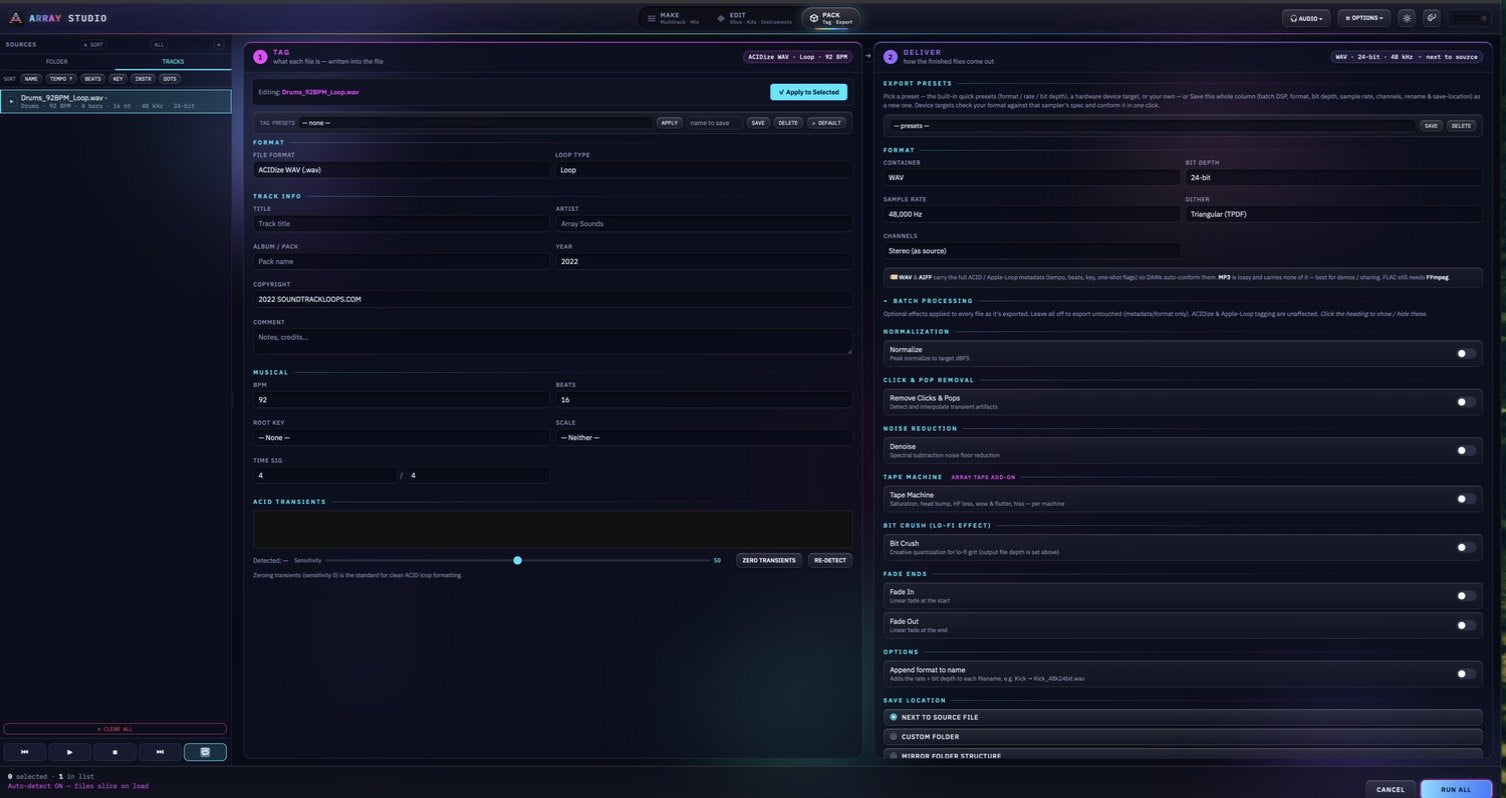
Tag it right. Deliver the whole pack.
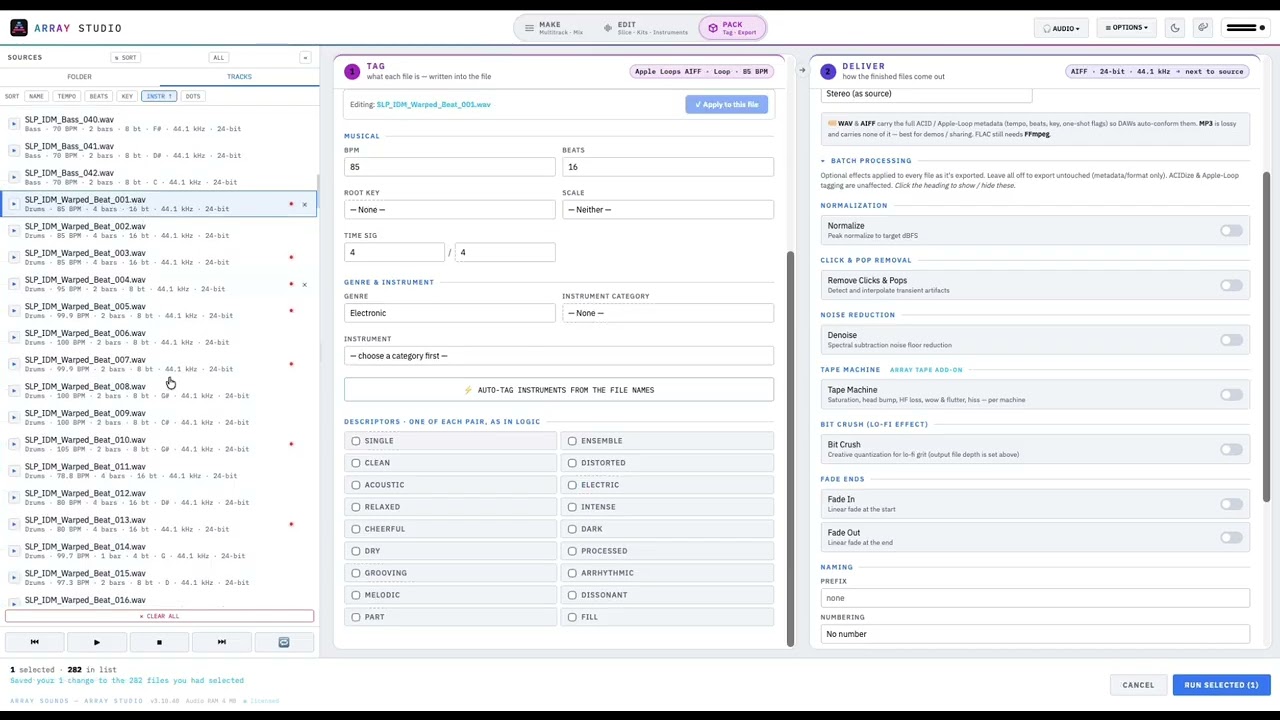
Every file on one page. Tag on the left, deliver on the right, and Run All does both in one pass: the ACID and Apple Loops metadata that makes loops auto-conform in every DAW.
- ACIDized WAV and Apple Loops AIFF written byte-exact, verified in Logic
- Auto tempo, key and pitch detection. Flags clicks and mismatched tags before your customers do
- Batch chain: resample, denoise, declick, tape machine, normalize, crush, fade
- Export presets and hardware device targets (SP-404 MKII, MPC, Digitakt and more)
- WAV, AIFF, FLAC and multi-core MP3, saved next to the source, a custom folder or a mirrored tree
Quick tutorial
See the Pack / Batch tab in action.
A quick overview of the Pack / Batch tab: how a folder of sounds becomes a tagged, finished pack.
New · Video editor + screen recorder
Make the sound. Make the video too.
Cut demos and tutorials on the same timeline as your audio, with titles, effects and transitions. Then record your screen, your camera and your voice in one take, without leaving the app. In Standard, Pro and the free trial.
Video · Edit
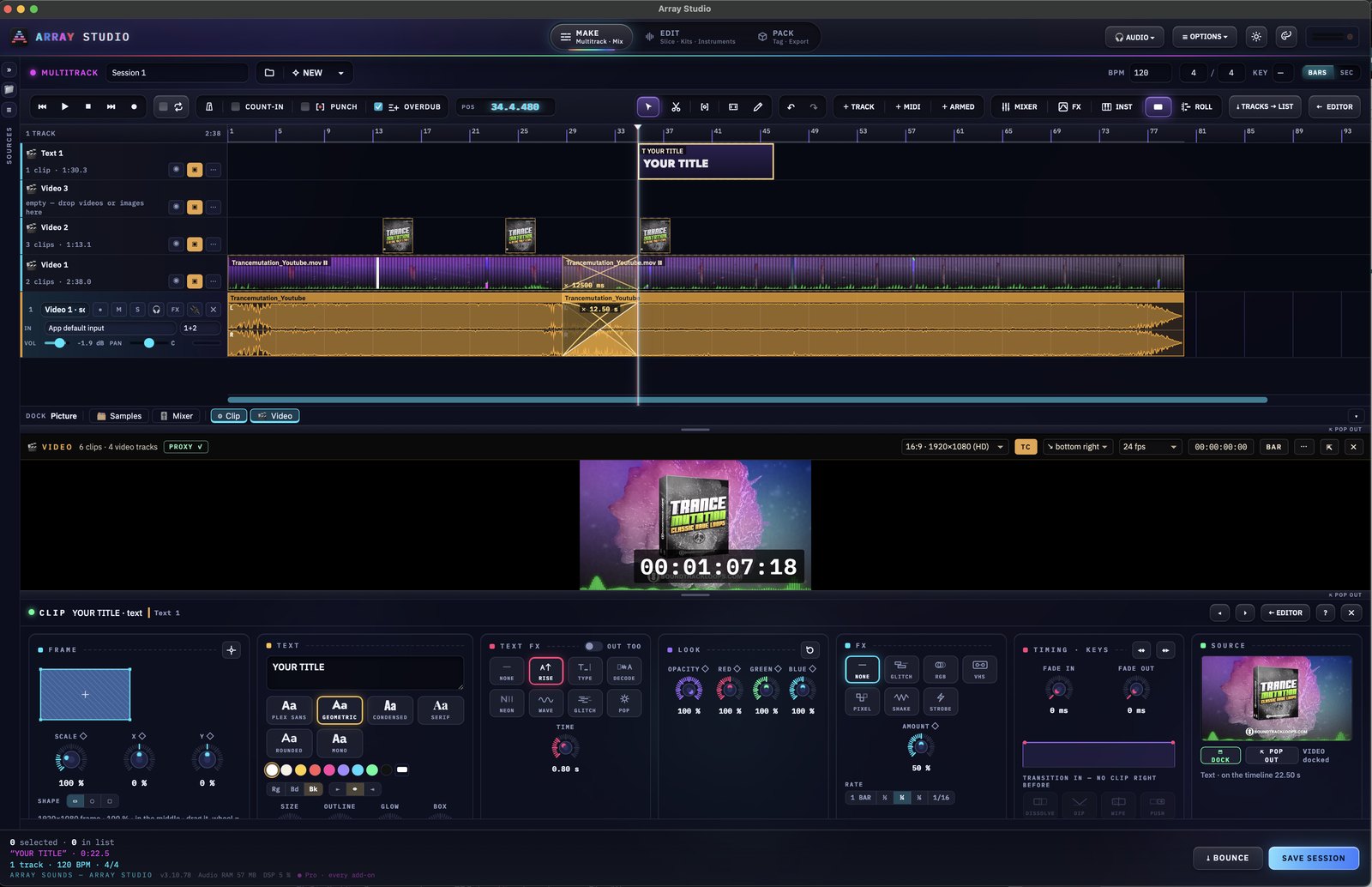
A video editor on your audio timeline.
Stack video, picture and text tracks right above your audio. Every cut, title and effect lines up with the music, because it’s the same timeline.
- Drop videos and images on their own tracks, and crossfade clips by overlapping them
- Titles in six type styles, with colour, outline, glow and a box behind the text
- Animated text: Rise, Type, Decode, Neon, Wave, Glitch and Pop
- Clip effects (Glitch, RGB, VHS, Pixel, Shake and Strobe) with a rate locked to your tempo, from 1 bar to 1/16
- Scale, position, opacity and colour per clip, with keyframes and fades in and out
- 1920×1080 HD, your choice of frame rate, burnt-in timecode and proxy playback for smooth editing
Video · Record
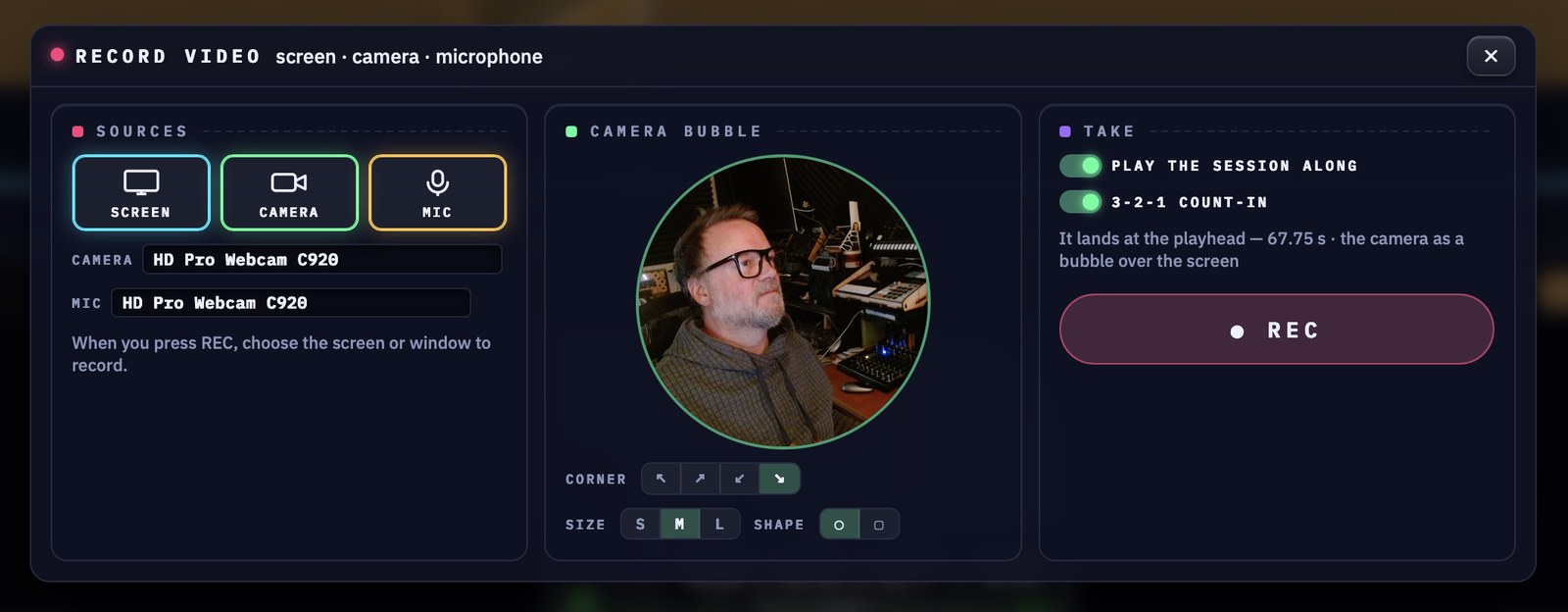
Screen, camera and mic. One take.
Press REC, choose the screen or window to capture, and talk it through. Your camera sits in a bubble over the screen, and the take drops onto the timeline ready to cut and title.
- Record your whole screen or a single window, with any webcam and microphone
- Camera bubble in any corner: small, medium or large, round or square
- Play your session along while you record, with a 3-2-1 count-in
- The take lands at the playhead, so you can cut it, title it and add effects straight away
Plug-in and audio software developers
Just built a new VST or AU? Record it running in your DAW with your face in the corner, talk through the controls, then title and cut the demo. One app, no video editing suite.
Show off your plug-in
Tutorial makers and YouTubers
Walk through a technique with your session playing along, then cut, title and finish the lesson on the same timeline. The music and the edit never drift apart.
Teach it on camera
Sample pack makers
Build the demo video for your pack next to the loops themselves: cover art, titles and glitch effects that hit on the beat, because they run on the session tempo.
Demo the pack
New in Array Studio
Mix it, score it, sample it. All in the same app.
A mixer with sends and returns, video on the timeline and a built-in multi-sampler. In Standard and Pro, no extra cost.
Score to video
Drop a movie file onto the multitrack. The picture gets its own track with thumbnails, its sound lands on a track lined up underneath, and the video window shows burnt-in timecode at the frame rate you pick.
Video on the timeline
Move tracks, crossfade clips
Drag any track to a new spot in the list. Slide one clip over its neighbour and they crossfade; drag further over or away to change the length.
Arrange faster
Array Channel EQ · Comp
A six-band EQ (low cut to high cut) and a compressor on every track, with presets for kick, snare, vocal, bass, mix bus and more. No added latency.
On every track
Array Space reverb + delay
Add Reverb and Delay returns and send any track to them. Plate reverb with decay, size and damping; tempo-synced ping-pong delay. Sends follow the fader, and soloing a track keeps its reverb.
Sends + returns
MIDI Learn anything
Right-click a knob, a fader or a button, choose MIDI Learn and move a control on your keyboard or controller. Forget every link in one click when you want to start over.
Your controller
Auto-sample your hardware
Array Studio plays your synth over MIDI, records every key you choose with hold and tail times and velocity layers, levels the set and writes WAV plus SFZ, Decent Sampler or SoundFont.
Multi-sampler built in
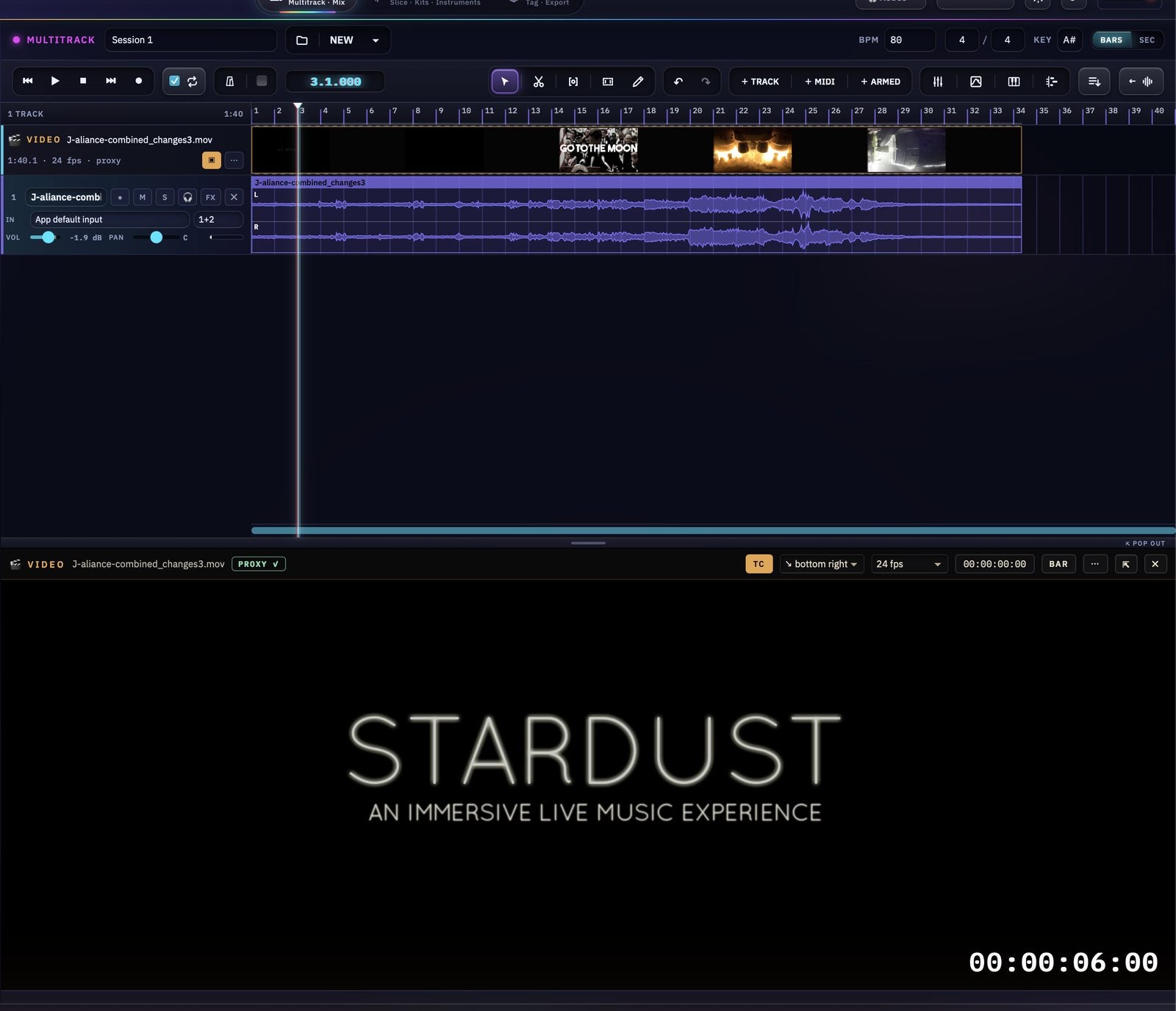
Score to videoDrop a movie on the timeline. Its sound lands on a track lined up under the picture, with timecode and frame rate.
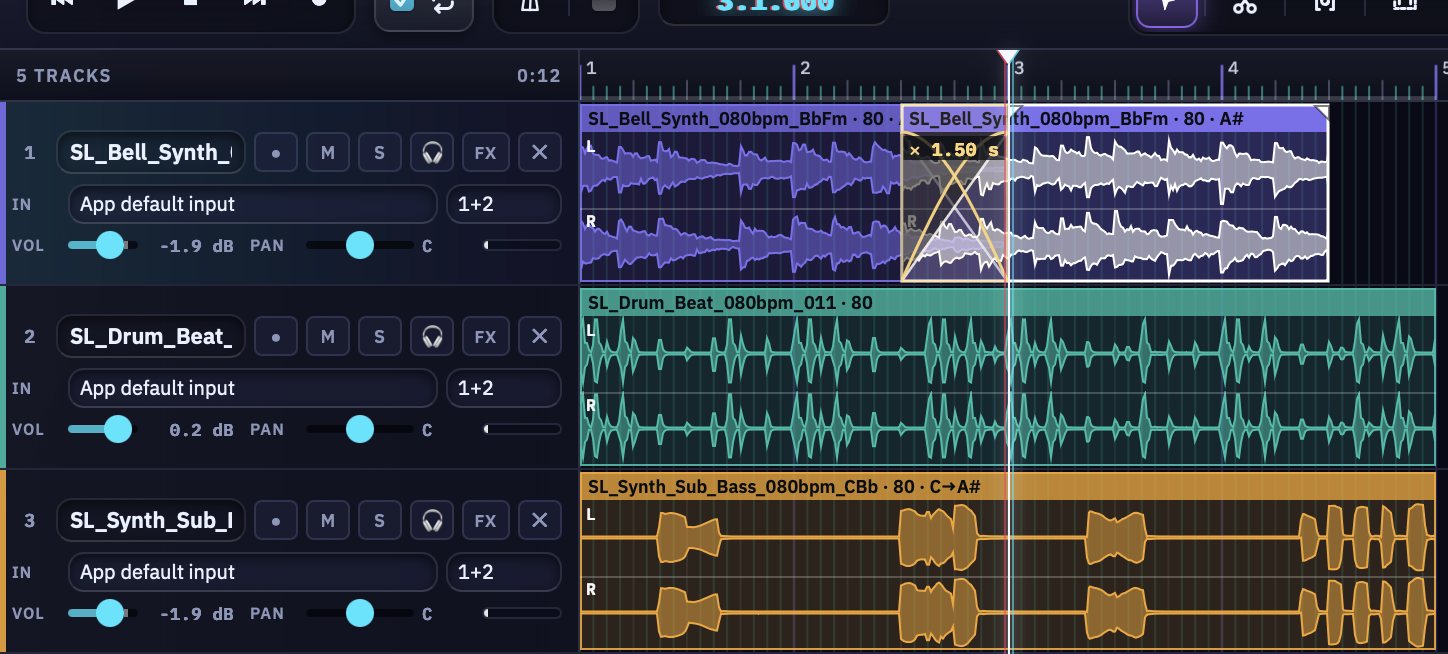
CrossfadesDrag one clip over its neighbour and they crossfade. Drag further over or away to change it.
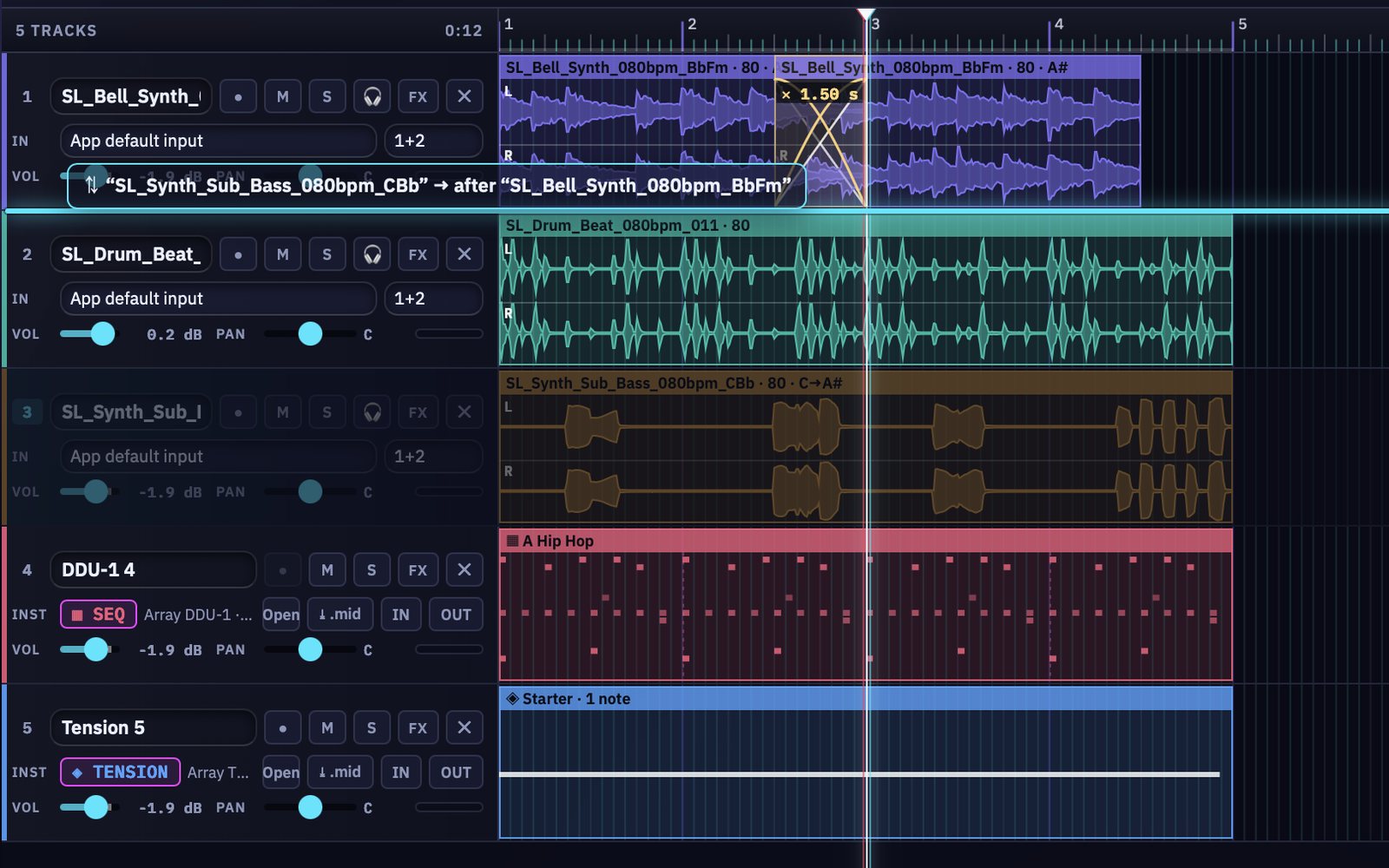
Move tracksGrab a track by its header and drop it anywhere in the list.
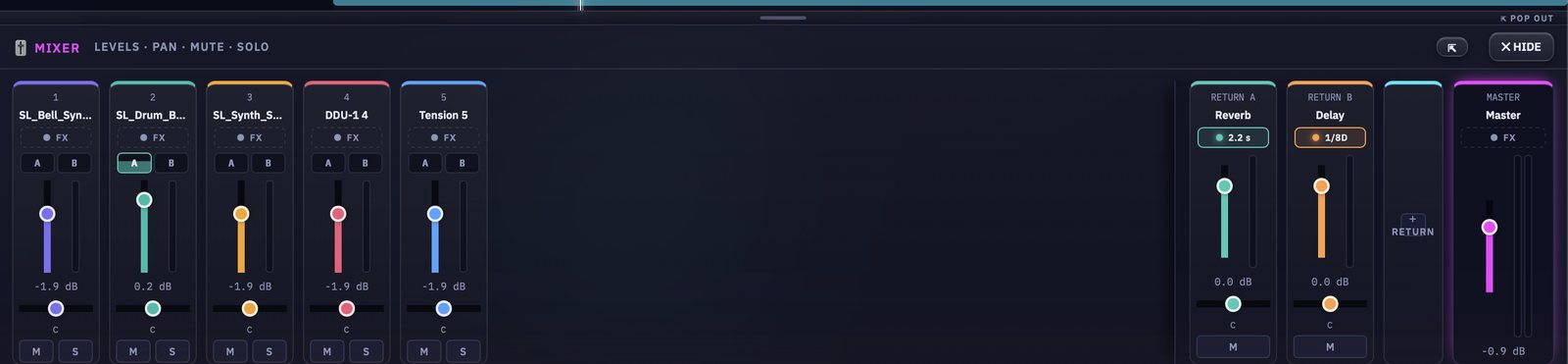
MixerLevels, pan, mute and solo for every track, with the Reverb and Delay returns next to the master.
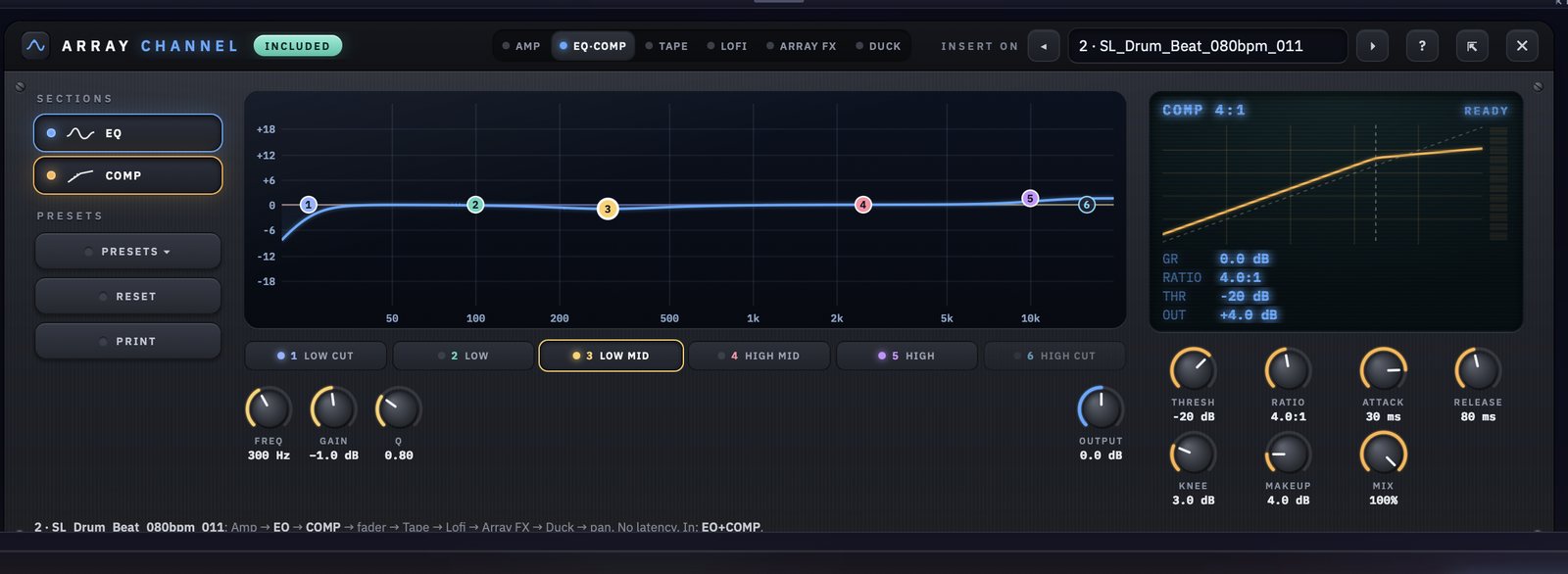
EQ · CompArray Channel on every track: a six-band EQ and a compressor, with presets and no latency.
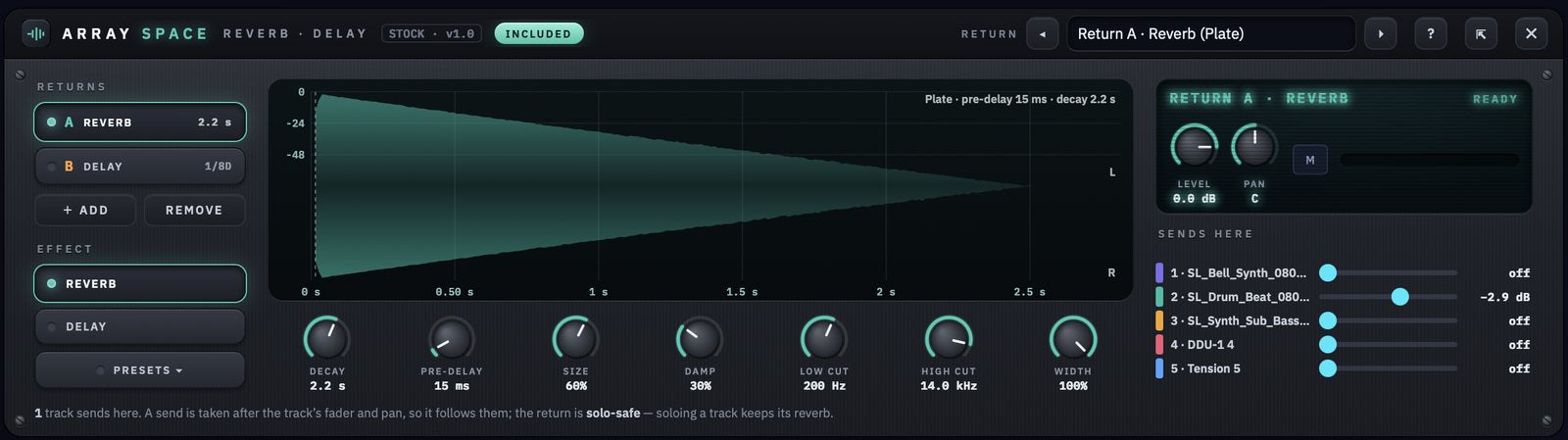
Space · ReverbReverb on a send/return, with every track’s send level right beside it.
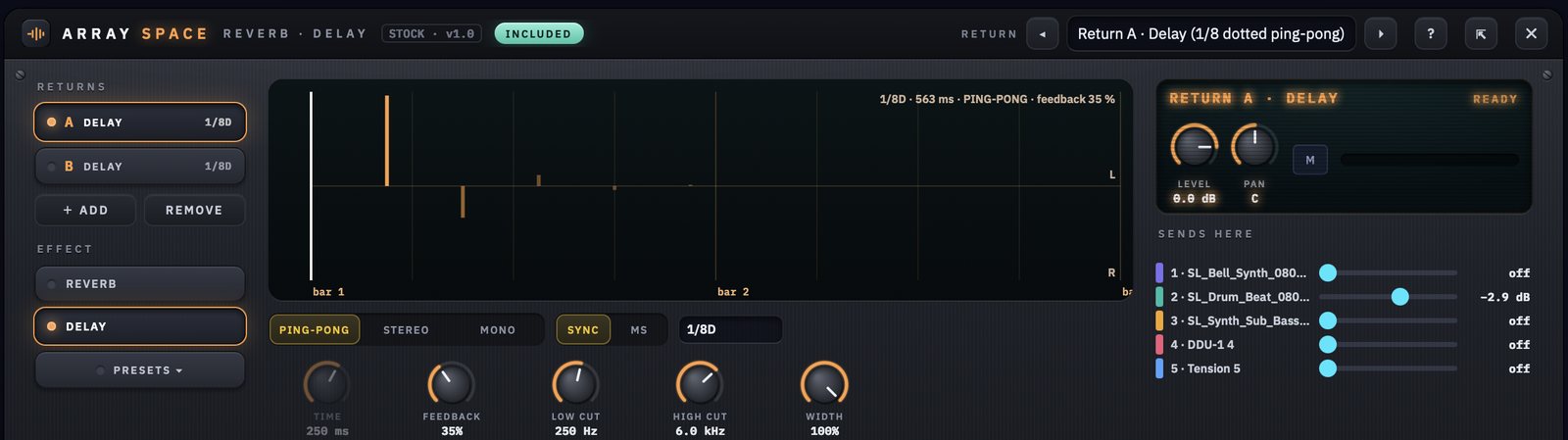
Space · DelayTempo-synced delay: ping-pong, stereo or mono, feedback, filters and width.
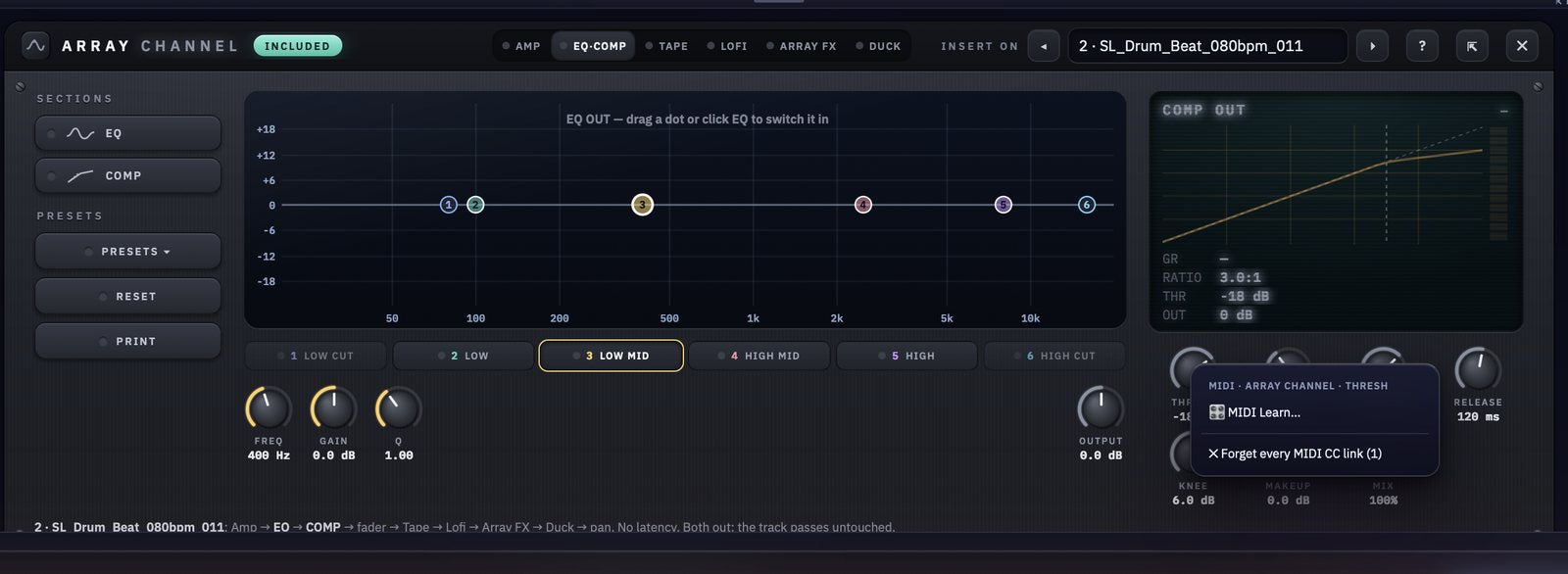
MIDI LearnRight-click any control and pick MIDI Learn, then move a knob on your controller.
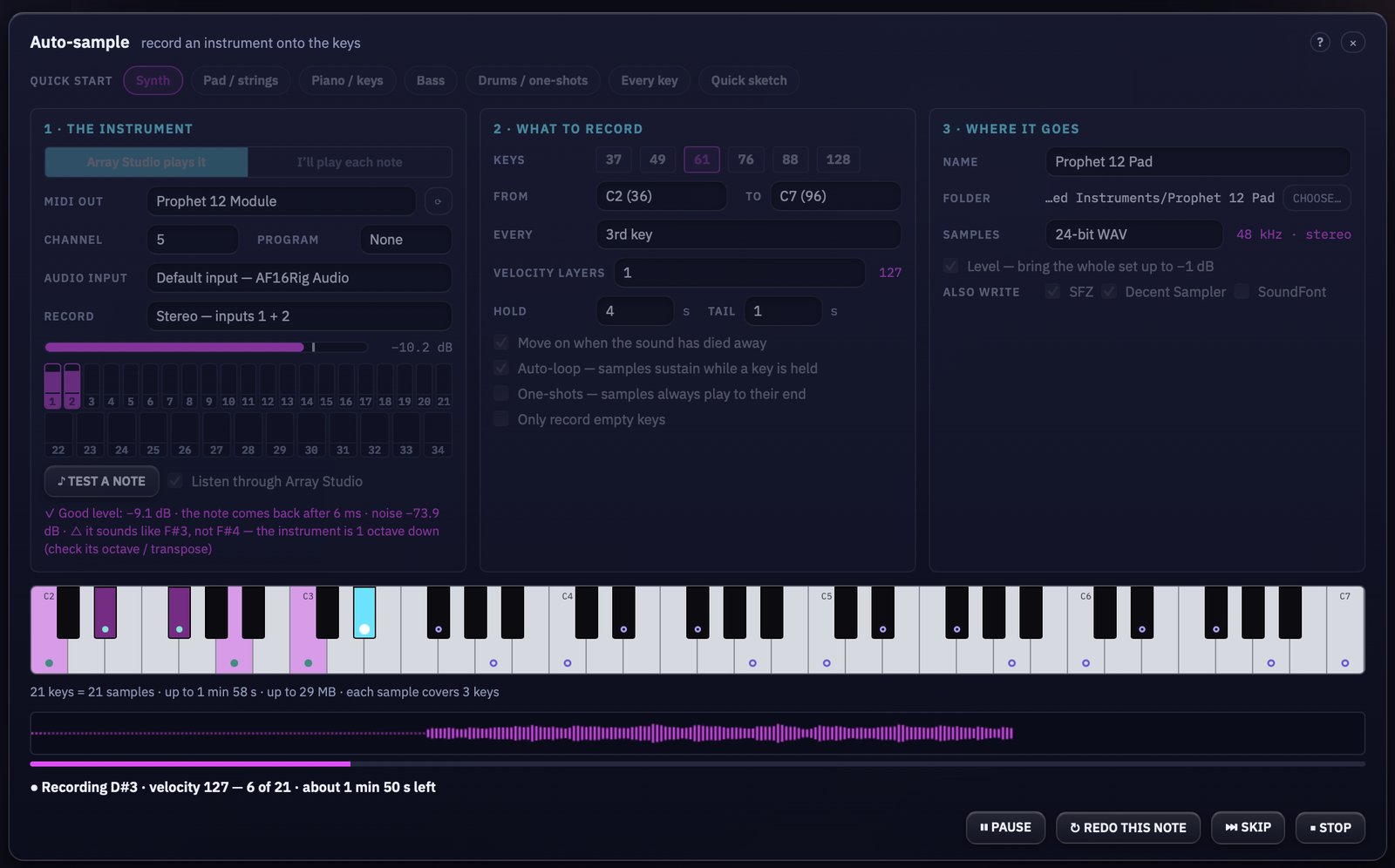
Auto-sampleArray Studio plays your synth note by note over MIDI and records every key. Here, a Prophet 12.
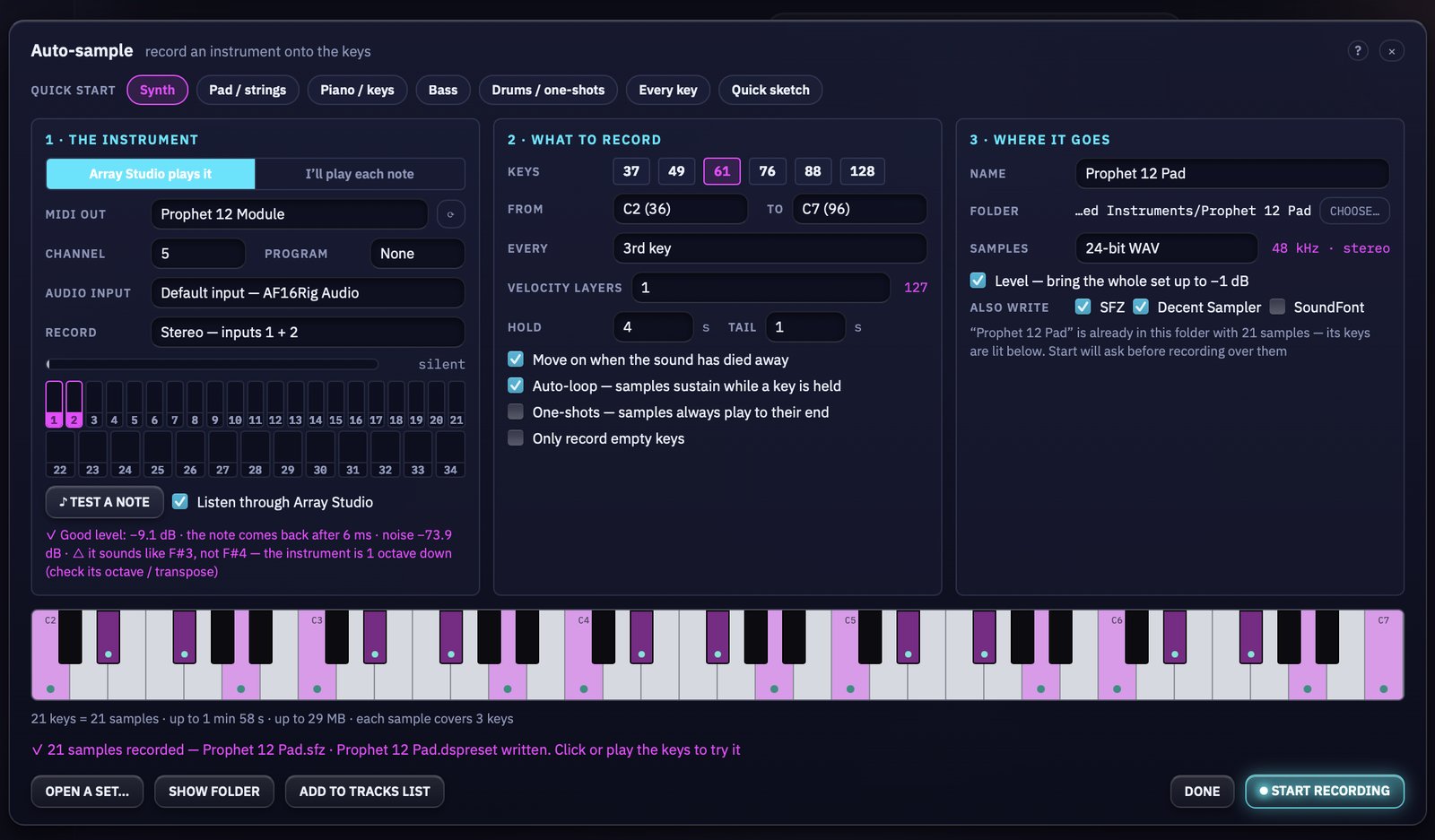
Sampled21 samples recorded, levelled and written as SFZ and Decent Sampler. Play the keys to try it.
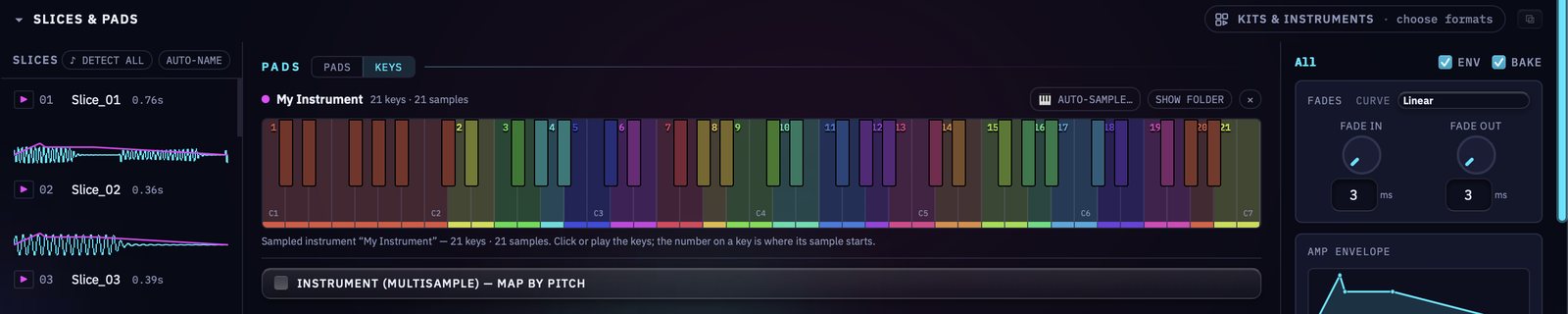
Mapped by pitchThe finished set lands on the keys, mapped by pitch and ready to play or export.
Off the line
Every format a finished pack ships in.
Loops that auto-conform in every DAW, drum kits for Drum Rack, MPC and Deluge, and multi-sample instruments auto-mapped by pitch. All from the same app.
WAV
ACIDized + RIFF INFO
AIFF · CAF
Apple Loops, Logic-verified
FLAC · MP3
Multi-core LAME encoding
Drum kits
Drum Rack · MPC · Deluge · numbered
Instruments
Kontakt / SFZ · Decent Sampler · SF2
MIDI
DDU-1, Chord Spire, extracted grooves
Hardware targets built in. Export presets and hardware device targets for the SP-404 MKII, MPC, Digitakt and more.
Instrument add-ons
Write the parts right in the studio.
Four instruments that live on their own tracks, each with its own patterns, sound, mix and effects. Add as many as you like; every render comes out identical, sample for sample.
Instrument
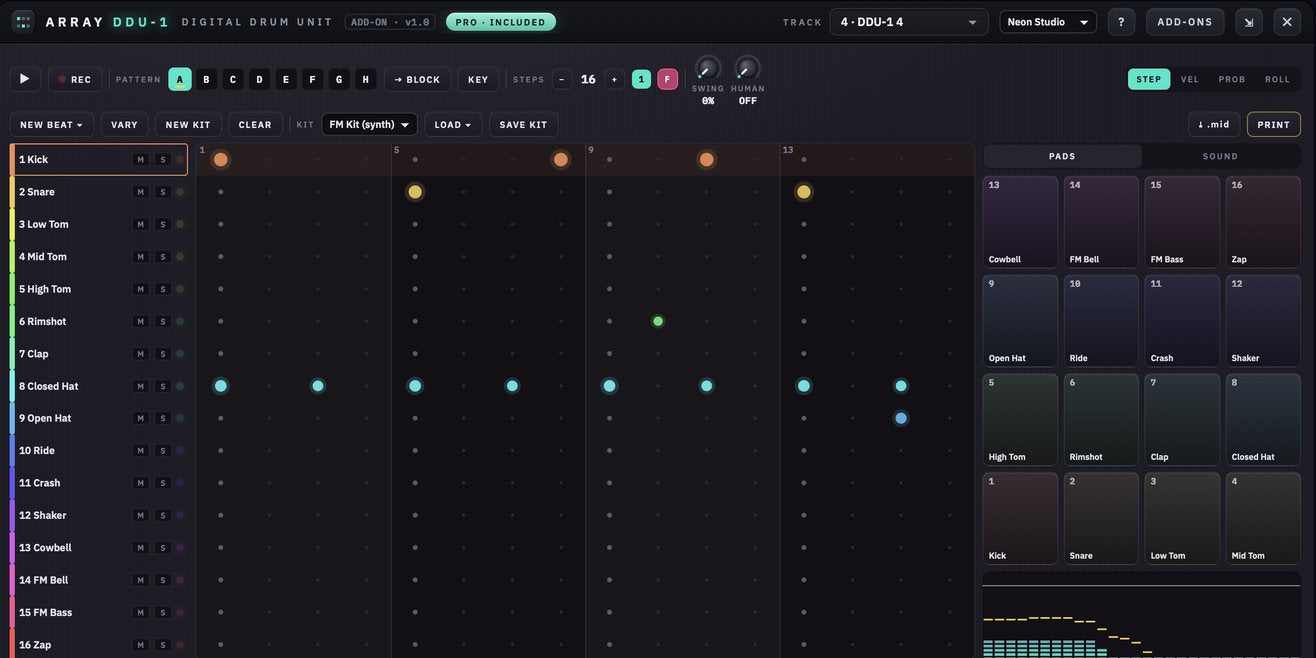
DDU-1 Digital Drum Unit
Drum machine · FM + sample kits
A 16-row step sequencer on its own track. Patterns A–H up to 64 steps with velocity, probability, rolls and held hits; a genre-aware NEW BEAT generator; FM drum synth or sample kits.
- Built-in kits: Analog 808, Drive 909, Trap Boom, Dusty Lo-Fi and more
- Drop your own one-shots or folders onto any row and save the kit
- Tunes pitched drums to the project key and exports GM .mid
Pro: includedStandard: $10
Instrument
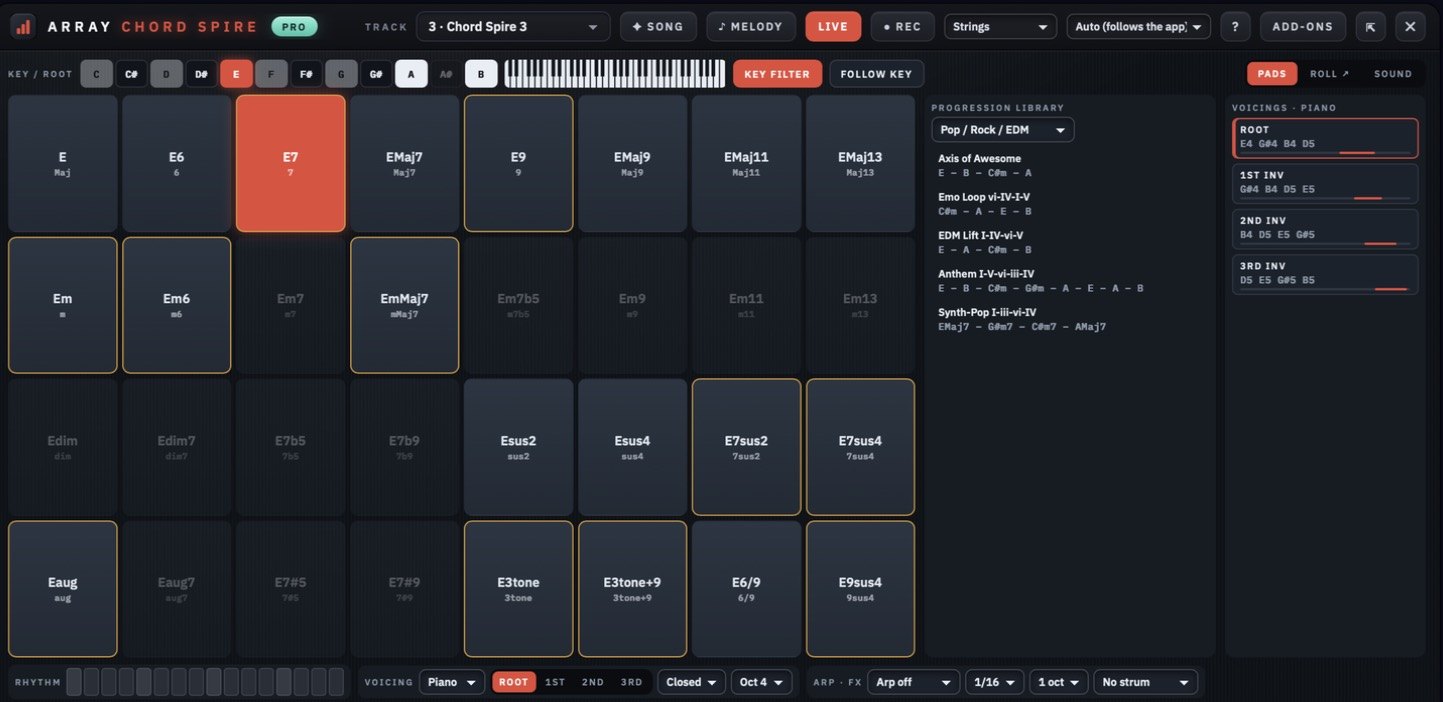
Chord Spire
Chords + melody writer
One chord per bar, as blocks on the timeline. 32 chord types, a 42-progression library across 9 genres, and a melody writer, played by ten instruments from grand piano to guitar.
- Piano or guitar voicings, inversions, strum, arp, swing
- SONG writes a key, progression and melody in one click
- Drag chords onto any MIDI track and export .mid
Pro: includedStandard: $10
Instrument
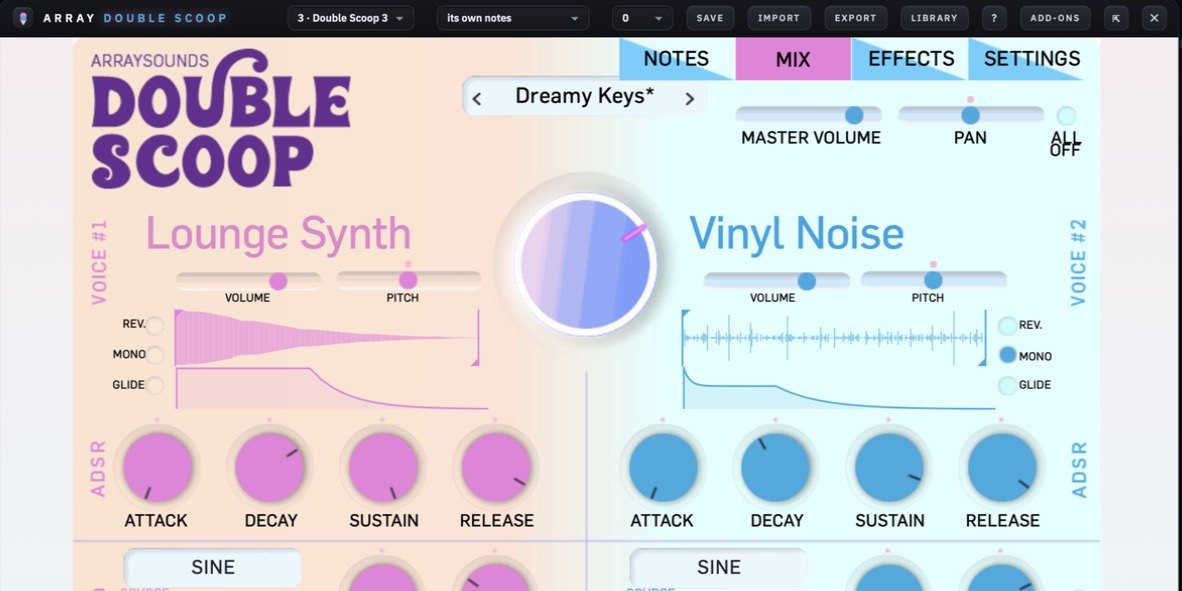
Double Scoop
Two-voice sample synth · 119 presets
Our Double Scoop plug-in on its own track: two sampled voices from 50 sounds recorded from vintage analog synths and a 76-key Rhodes, with FM, filters, freeze reverb and tempo delay.
- Same panel and the same 119 presets as the plug-in
- Play it live, or let it follow a Chord Spire track
- Already own the plug-in? The add-on is included
Pro: includedStandard: $10
New · coming soon
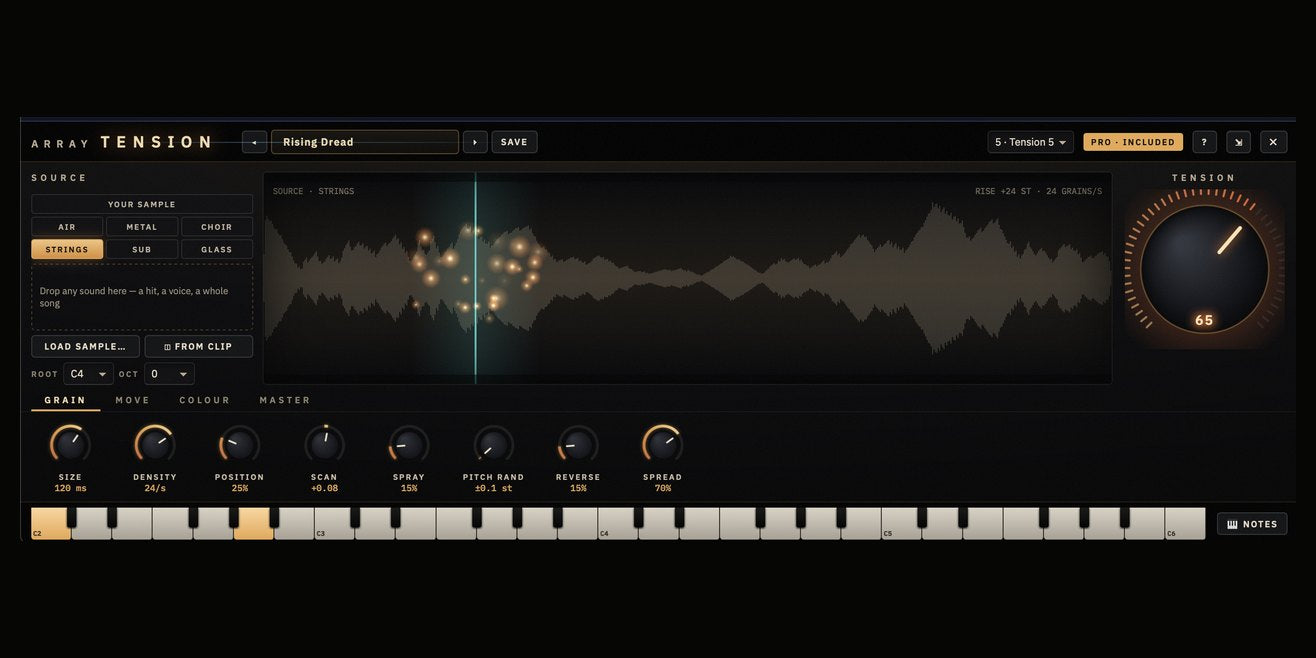
Tension
Cinematic hits, drones + textures
A granular instrument on its own track. Scatter any sound into grains, or start from Air, Metal, Choir, Strings, Sub or Glass, then drive the whole build from one big Tension dial.
- Load your own sample, or grab one straight from a clip on the timeline
- Grain size, density, position, scan, spray, pitch, reverse and spread
- Presets for hits, drones, textures and pulses: Braam, Abyss Drone, Metal Swarm
Pro: includedStandard: $10
All four are included with Pro. On Standard, add any instrument for $10: DDU-1, Chord Spire, Double Scoop or Tension.
Effect add-ons
Amp, tape and lofi. Built right in.
Five effect plug-ins on every track and on the master, each with automation, PRINT, and bounces that sound exactly like playback.
Effect
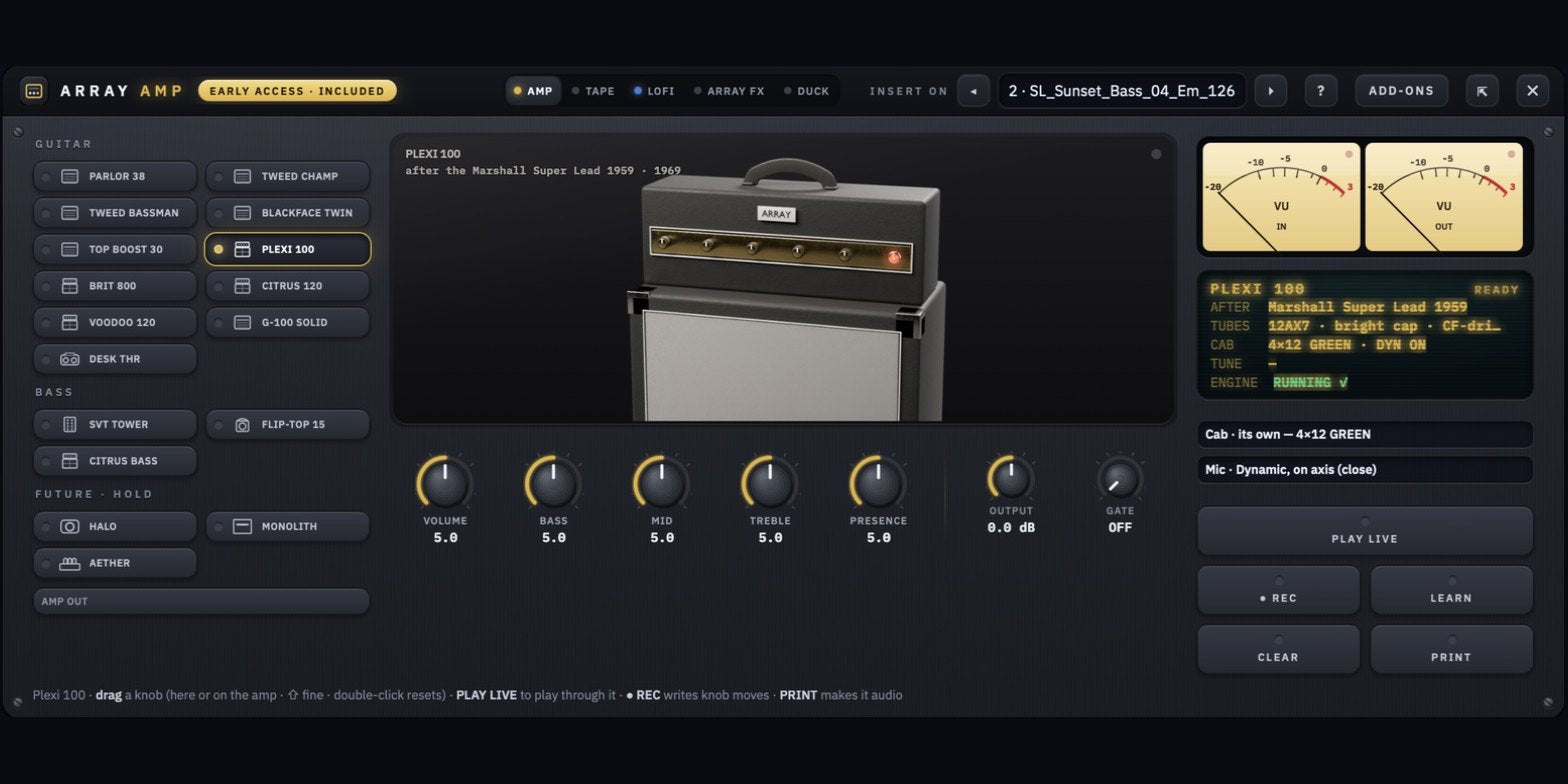
Array Amp
Guitar & bass · 17 amps
17 guitar and bass amps, each with its own tone stack, sag, cab and mic. Play live or re-amp a DI.
- Guitar, bass and three Array originals with HOLD drones
- Built-in gate, tuner, cab + mic choice
- PRINT renders the amp to a new track
Early accessIncluded
Effect
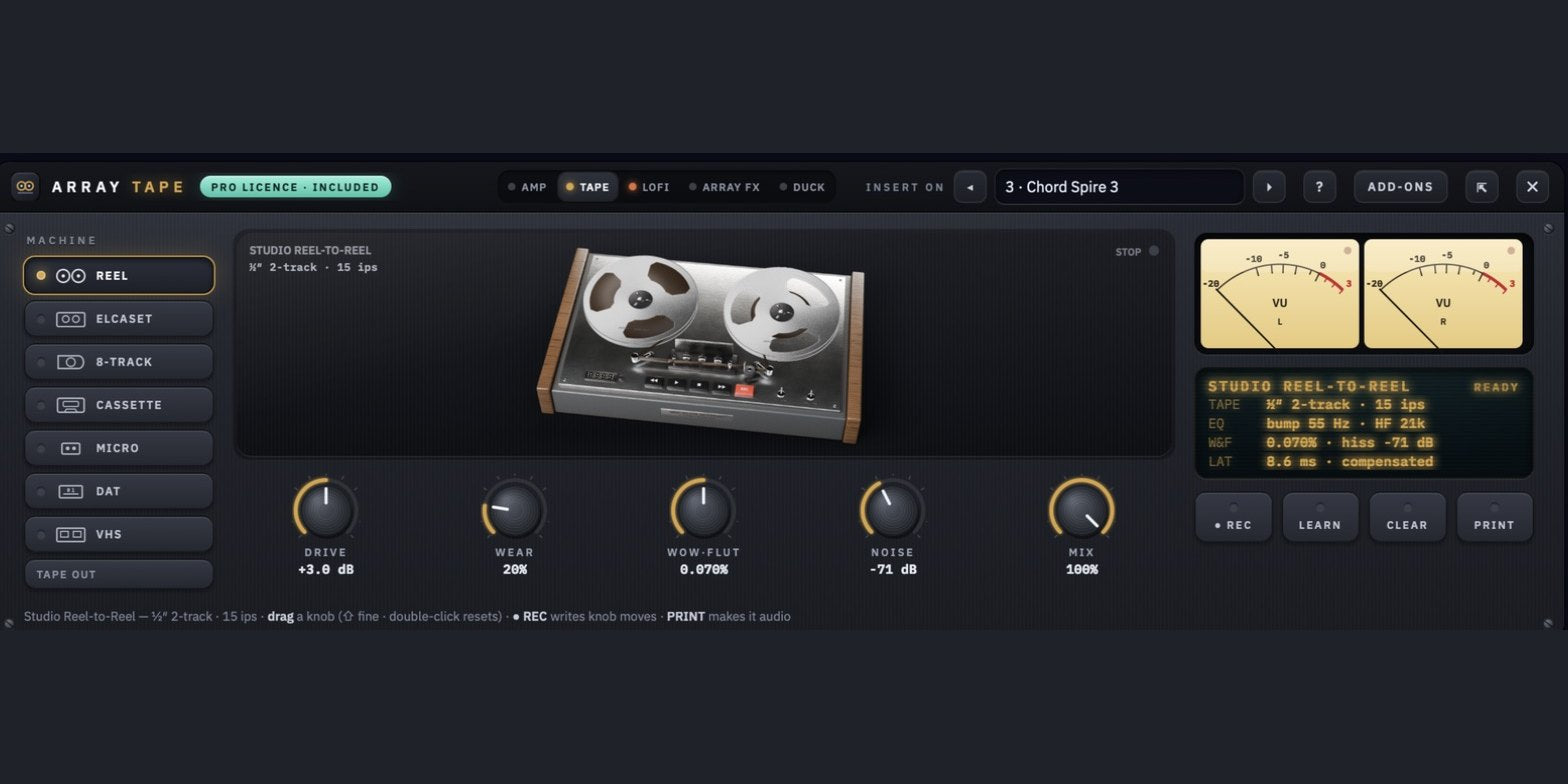
Array Tape
7 tape machines
Seven machines (studio reel, Elcaset, 8-track, cassette, microcassette, DAT and VHS) with drive, wear, wow & flutter and hiss. Runs in batch export too.
- Path-traced 3D machines that turn with the song
- Latency-compensated and sample-aligned
- Print every file in a pack through tape
Early accessIncluded
Effect
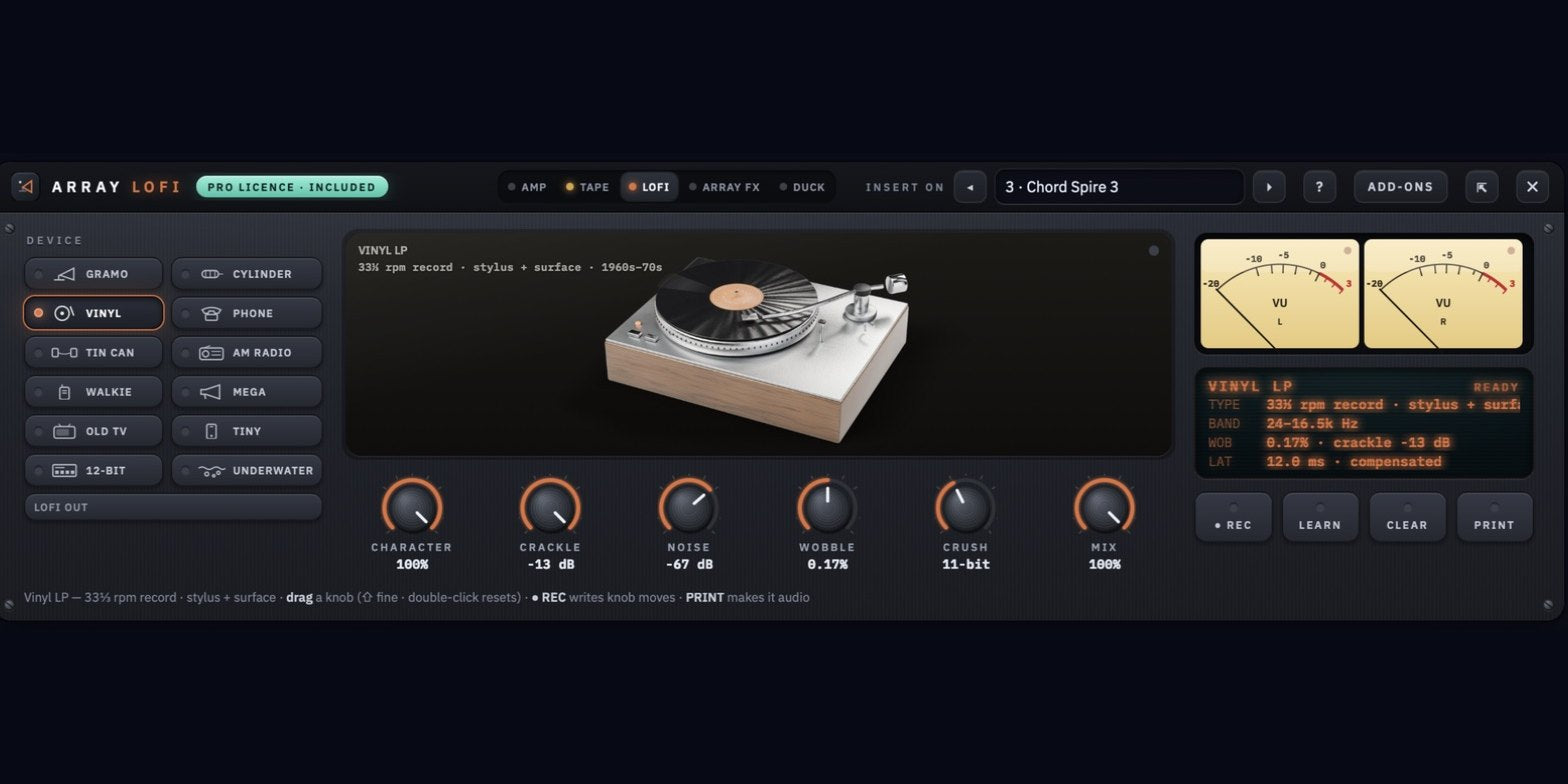
Array Lofi
12 vintage devices
Gramophone horn, wax cylinder, vinyl, old telephone, megaphone, AM radio, walkie, old TV, underwater and a 12-bit sampler, each with its own speaker, noise and wobble.
- Character, crackle, noise, wobble and crush
- Automatable, printable, bounce-exact
Early accessIncluded
Effect
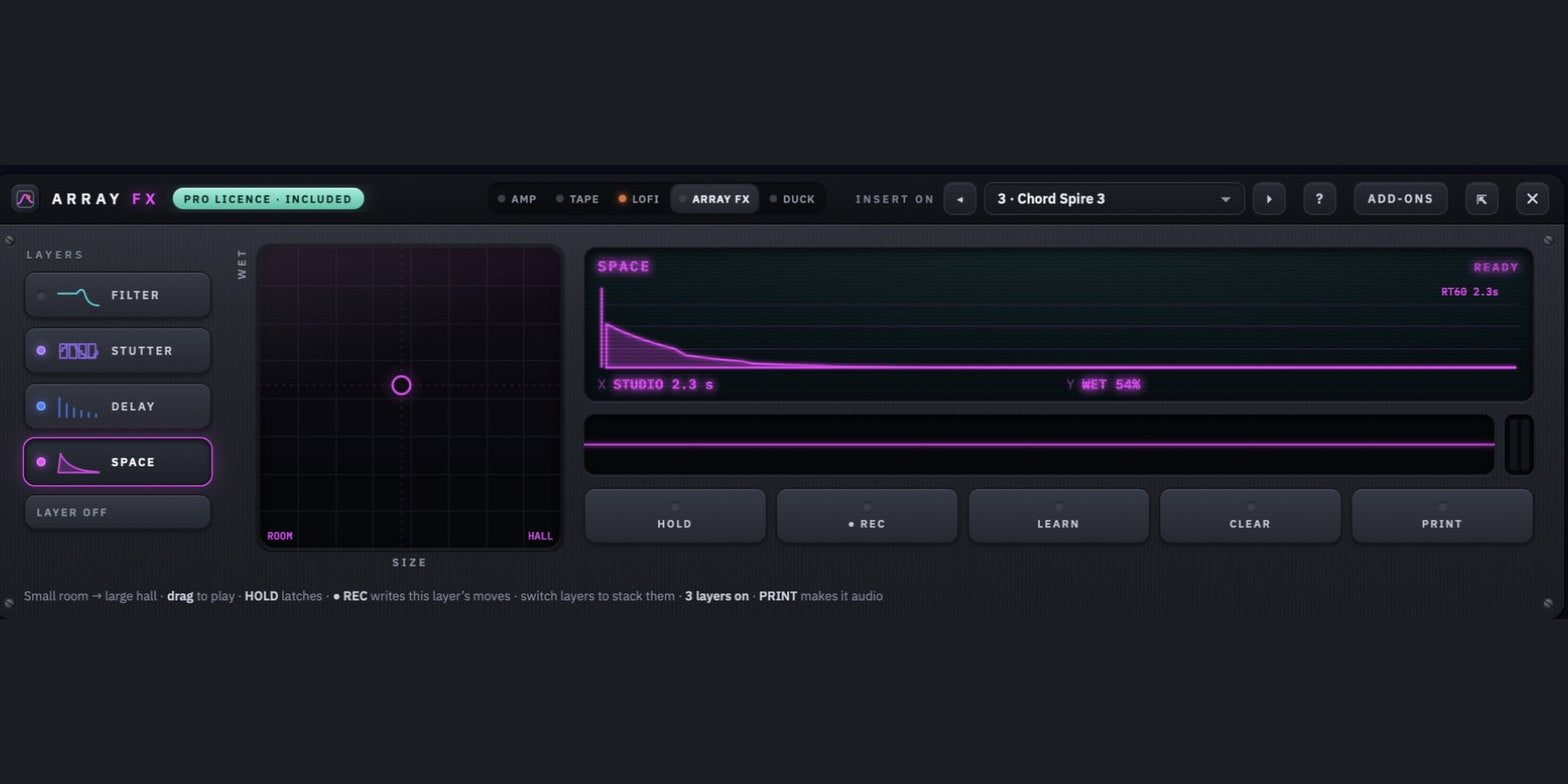
Array FX
XY performance pad
Four layers on every insert (Filter, Stutter · Crush, Tempo Delay and Space) performed on an XY pad and recorded as automation, layer by layer.
- Tempo-locked delays and beat-repeats
- MIDI Learn any control, with HOLD per layer
- Seamless loop bounces wrap the tails
Early accessIncluded
Effect
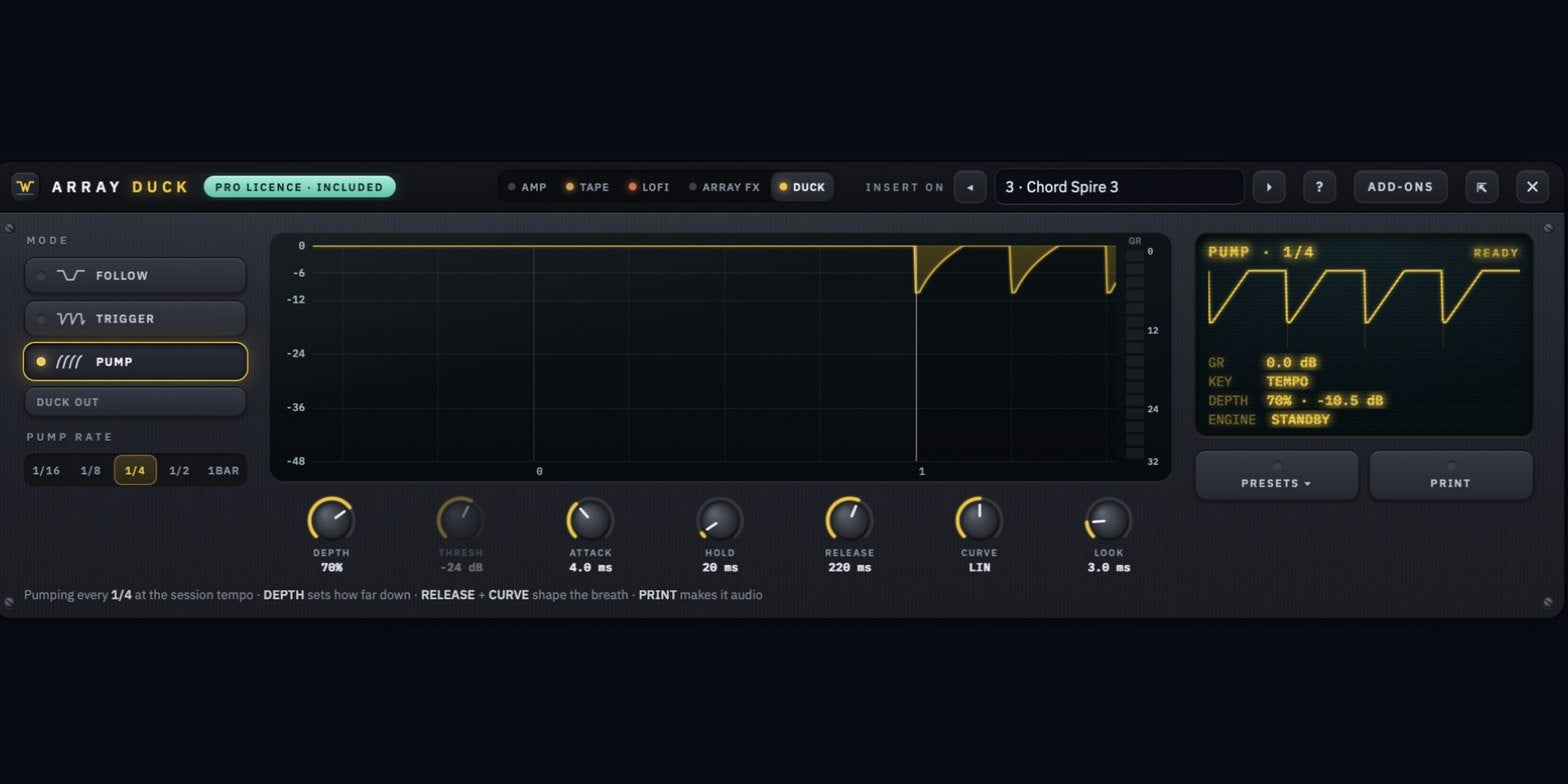
Array Duck
Sidechain · pump · follow
Any track can duck any other. Follow a key track, trigger the classic kick pump from your real pattern, or pump on the beat with no key at all, with zero latency.
- Pick one DDU-1 row as the key
- Look-ahead keeps the kick attack clean
Early accessIncluded
Limited-time early access: all five effect add-ons are included with every license, Pro and Standard, and you keep them after they go on sale at $5 each.
Included during early access
Find the sound in seconds.
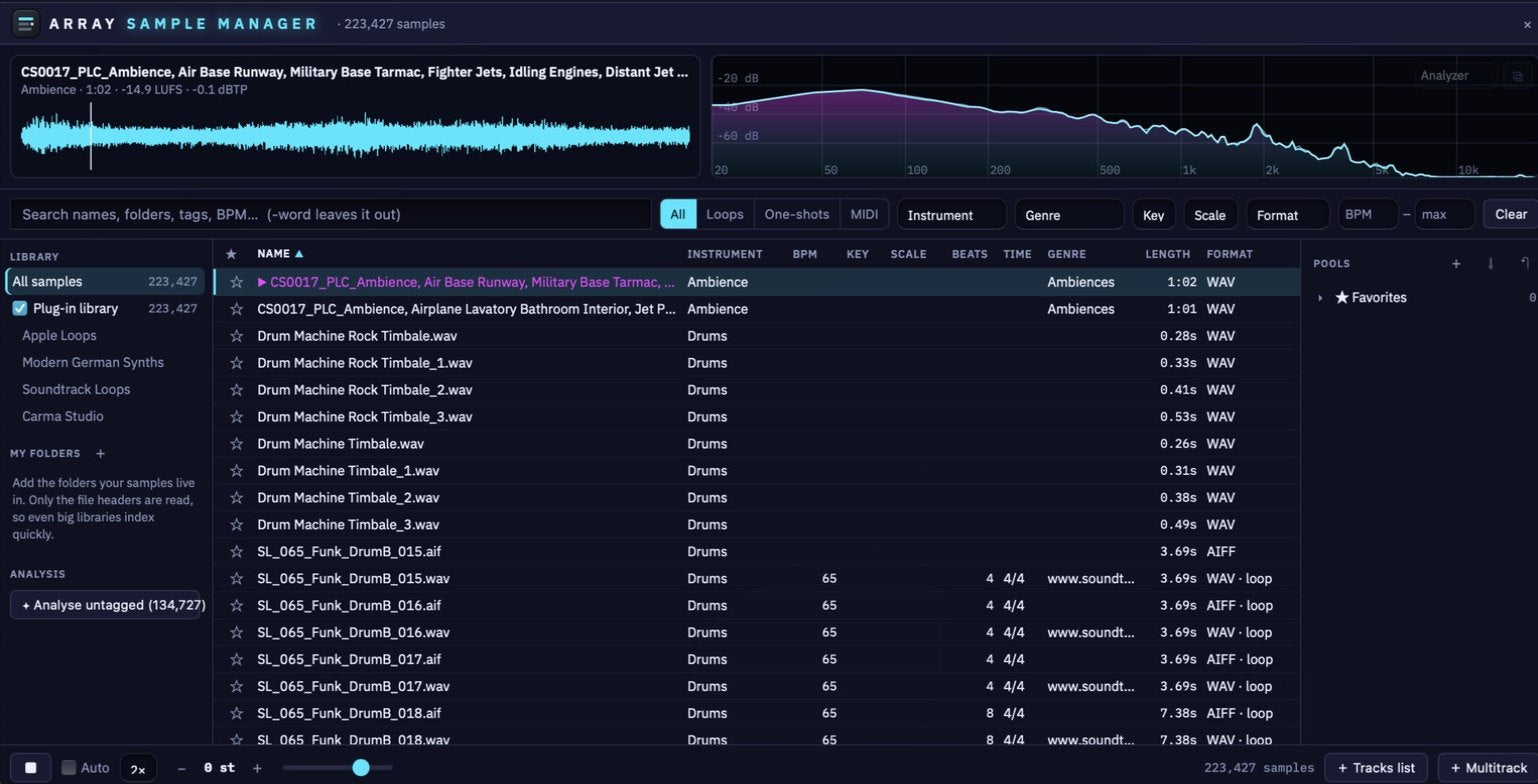
Array Sample Manager · Your whole library · 9 visualizers
Every sample you own in one searchable library, inside Array Studio. It reads ACID, Apple Loops, WAV / AIFF tags, MP3, CAF, MIDI and file names, analyses anything untagged for tempo, key and loudness, and keeps up with your folders live.
- Search by name, pack, key, scale, BPM range, instrument, genre and format
- Audition in key and tempo, with 16 pools and Favorites
- Drag straight onto a lane, a DDU-1 row, a pad or the Keys
- Nine visualizers (Bars, Scope, Fire, Spectrogram, Julia and more) pop out full-screen on a second monitor
Under the hood
Pack-grade from the first file.
25 years of formatting sounds for top producers and sample companies, built into every step.
ACID + Apple Loops, done right
Byte-exact ACIDized WAV and Apple Loops AIFF (tempo, key, beats, loop/one-shot and descriptors) verified in Logic, ACID Pro, FL Studio and Cubase. Re-save markers repairs Apple Loops that won’t stretch.
The part nobody else cracked
Detection that shows its work
Tempo, key and pitch from the filename, embedded tags and the audio itself. A tick when they agree, a warning when they don’t: a prompt to listen, never a silent overwrite.
Tempo · Key · Pitch
Problems flagged before customers see them
Red dot for a possible click at the start or end. Yellow dot for a tempo, key, beat count or loop type that disagrees with the audio. Sort by dots to fix a whole pack fast.
Click + mismatch warnings
Loop Fix
A true loop is a whole number of beats at a whole-number BPM. Trim the overhang, blend the tail into the start, or pad a short loop onto the grid, then save it as a new file.
Exact-tempo loops
Batch everything
Resample, denoise, declick, tape machine, normalize, bit-crush and fade across a whole folder, then export WAV, AIFF, FLAC or multi-core MP3 with presets and hardware device targets.
One pass · Run All
Built for real sessions
Pop any panel into its own window for a second monitor, undo every timeline change, markers, skins and waveform styles, and it all runs offline on your machine.
Mac + Windows · Offline
25 years in the industry
Formatted for the pros. Now it’s yours.
25 years of professional audio formatting for companies such as Roland, Native Instruments, Loopmasters, Antares, Prime Loops, Acoustica Mixcraft, Sony, Magix, 1010music, and Soundtrack Loops. Our roots trace back to Sonic Foundry, the creators of ACID and Sound Forge, so we know these formats inside out.
All of that knowledge and hard work is baked into Array Studio: the ultimate sample pack manufacturer.
Pick your studio
Pro or Standard. Both yours for life.
One-time purchase, no subscription, free updates for life. Both tiers are the full Array Studio app. Pro adds the four instruments and includes every add-on and plug-in.
Limited-time early accessEvery license bought now includes the five FX add-ons (Amp, Tape, Lofi, Array FX, Duck) and Sample Manager with visualizers, and you keep them after they go on sale. Intro prices won’t last.
Everything included
Array Studio Pro
The complete studio: every instrument, every add-on and plug-in, included.
$99one-time
Introductory price
- Full Array Studio app: Make, Edit and Pack
- DDU-1, Chord Spire, Double Scoop and Tension instruments
- Mixer with EQ · Comp, Space reverb + delay and sends
- Video editor with titles and effects, plus a screen + camera recorder
- All five FX add-ons + Sample Manager
- Free updates for life
- Mac and Windows
Add instruments later
Array Studio Standard
The full studio without the instruments. Add them one at a time.
$69one-time
Introductory price
- Full Array Studio app: Make, Edit and Pack
- Mixer with EQ · Comp, Space reverb + delay and sends
- Video editor with titles and effects, plus a screen + camera recorder
- FX add-ons + Sample Manager (early access)
- Free updates for life
- Mac and Windows
- DDU-1, Chord Spire, Double Scoop, Tension: $10 each
Try it first
Array Studio Free Trial
Both Pro and Standard come with a free trial, and everything works while you try it.
Freetrial
Before you buy
- Try every Pro feature before you buy
- All three rooms: Make, Edit and Pack
- Video editor + screen recorder included
- Mac and Windows
Instruments · $10 eachDDU-1, Chord Spire or Double Scoop: add any of them to Standard whenever you’re ready. Tension joins them soon.
Effect add-ons · $5 eachOnce they go on sale. Early-access buyers keep Amp, Tape, Lofi, FX, Duck and Sample Manager for free.
Grow into itStart on Standard and add instruments or add-ons as you need them. Each one unlocks inside the app with its own serial, offline.
Only need the tagging?
Array Studio Batch is the ACID + Apple Loops tagging engine on its own: tag and deliver a whole folder in one pass. $10, one-time.
In it for the long run
Built by us. Built for you.
Array Studio is our own daily driver. It started as a tool to finish our own packs, and grew into the studio we always wanted. We ship updates constantly because we use it constantly, and every feature comes from a problem we hit in our own sessions first.
What you need
A standalone desktop app for Mac and Windows. No DAW, no plug-in host, no subscription.
- macOS 12+ (Apple Silicon)
- Windows 10 / 11 (64-bit). WebView2 installs automatically if needed
- Runs fully offline: offline license activation, nothing uploaded
- Microphone access for recording (you’ll be asked once)
- Double Scoop sound library: separate 2.2 GB download
Talk to a real human.
Bug, feature request, install question, hardware target you want added: write to us. We read every email and reply personally, usually within a business day.
Questions
Good to know before you buy.
Do I need a DAW or a plug-in host?
No. Array Studio is a standalone desktop app for Mac and Windows. No DAW, no plug-in host, no subscription.
What is the difference between Pro and Standard?
Both are the full Array Studio app with the Make, Edit and Pack rooms. Pro includes the four instruments (DDU-1, Chord Spire, Double Scoop and Tension) and every add-on and plug-in. Standard leaves the instruments out, and you can add any of them for $10 each.
What does early access include?
Every license bought during early access includes the five FX add-ons (Amp, Tape, Lofi, Array FX and Duck) and Sample Manager with visualizers. You keep them after they go on sale. Intro prices are for a limited time.
Is it a subscription?
No. It is a one-time purchase with free updates for life.
Can I try it before I buy?
Yes. Both Pro and Standard come with a free trial, and everything works while you try it.
Does it need an internet connection?
No. Array Studio runs fully offline, with offline license activation, and nothing is uploaded.
Which computers does it run on?
macOS 12 or later on Apple Silicon, and Windows 10 or 11 (64-bit). On Windows, WebView2 installs automatically if needed.
I already own the Double Scoop plug-in. Do I pay for it again?
No. If you already own the Double Scoop plug-in, the Double Scoop add-on for Array Studio is included.
Can I sample my hardware synths?
Yes. Auto-sample in the Edit room plays your synth over MIDI, records each key you choose and maps the set across the keys. It writes 24-bit WAV with SFZ, Decent Sampler or SoundFont files, in Standard and Pro.
Can I score to video?
Yes. Drop a video onto the multitrack: the picture gets its own track and the video window shows burnt-in timecode, with its sound on a track lined up underneath.
Can I edit video and add titles?
Yes. Video, picture and text tracks sit on the same timeline as your audio. Add titles with animated text, clip effects synced to your tempo, keyframes, fades and transitions, in Standard, Pro and the free trial.
Can I record my screen and camera for a demo or tutorial?
Yes. Record Video captures your screen or a single window, your webcam as a bubble in the corner and your microphone, in one take. Your session can play along with a 3-2-1 count-in, and the take lands on the timeline ready to edit. It’s ideal for plug-in demos, tutorials and sample pack videos.
Can I use my VST / AU plug-ins?
Not yet. VST and AU plug-in support is coming in a future release. Until then, Array Studio comes with its own instruments and effects, and Double Scoop also comes as an Array Studio instrument. If you make plug-ins, you can already use Record Video to film demos of them running in your DAW.
I only need ACID and Apple Loops tagging. Is there something smaller?
Yes. Array Studio Batch is the tagging engine on its own, for $10.
Is Array Studio the same thing as Soundtrack Loops Studio+?
No. Studio+ is the Soundtrack Loops sound library collection. Array Studio is desktop software for making, editing and packing your own sounds.
Ready to ship packs?
Your whole studio.One app. Yours for life.
Make it, edit it, tag it, deliver it, then make the video, on Mac or Windows, entirely offline. Early access includes the five FX add-ons and Sample Manager, and the intro prices won’t last. Not sure yet? Try it free first.
Pro $99 · Standard $69 · Introductory prices · One-time purchase · Free updates for life · Mac + Windows
